ChargePoint Charging Station Guide: Cost, Network, and Home Charging
ChargePoint operates the largest public EV charging network in the United States. You can find over 100,000 stations spread across all 50 states. Yet, many new EV owners get surprised when they first plug in. The pricing model often catches people off guard. The network does not operate like a traditional gas station chain.
This guide breaks down how a ChargePoint charging station works in the real world. We will look at actual session rates and billing quirks. We will also explore the ChargePoint Home Flex charger and residential backup power.
How the ChargePoint Network Works
The ChargePoint network operates differently from traditional gas station chains or centrally owned charging networks. Instead of owning and managing every location directly, ChargePoint provides the cloud platform, charging hardware, and payment infrastructure that links independent site hosts with everyday drivers.
Here's how it actually works:
ChargePoint provides the technology that connects station owners, EV drivers, and payment processing.
The ChargePoint app helps drivers find nearby stations, check real-time availability, view pricing, and start charging from their phone.
Drivers can also use an RFID card or supported key fob to start charging without opening the app.
Using an RFID card can be helpful when cellular service is weak or unavailable.
Station owners can set their own charging prices, so rates can vary from one location to another.
The network supports a broad range of EVs and plug-in hybrids, including vehicles from Tesla, BMW, Toyota, and other automakers.
Drivers should check the connector type before visiting a station to make sure it works with their vehicle.
Since ChargePoint does not own the stations, pricing works differently than most drivers expect.
What Charging at a ChargePoint Station Actually Costs
You will not find a single, flat ChargePoint charging station cost nationwide. The property host decides how much to bill you for juice.
Some locations offer charging completely free as a perk for customers. Other spots charge steep rates to discourage drivers from lingering. Always check station rates on your phone screen before pulling into the parking stall.
Common Pricing Models on the Network
Hosts structure their pricing in a few distinct ways:
Per-Kilowatt-Hour (kWh): You pay directly for the electricity delivered to your battery pack. Rates usually sit between $0.20 and $0.45 per kWh.
Per-Hour (Hourly): You pay for the total time your car remains connected to the plug. Rates often range from $1.00 to $3.00 per hour on Level 2 units.
Flat session fee: A fixed fee triggers the moment you start charging. The host might charge $2.00 to initiate, plus an hourly rate.
Idle fees: Hosts want to keep parking spots moving. If your battery finishes charging and you stay parked, idle fees kick in. These penalties can hit $5.00 to $10.00 per hour.
Typical Cost Scenarios
The overall cost of EV charging stations depends heavily on where you plug in. Here is how a standard 30-kWh top-up looks across different station hosts:
Station Location / Host Type | Billing Structure | Estimated Cost (30 kWh) | Key Driver Takeaway |
Suburban Grocery Store | Free amenity (First 2 hours) | $0.00 | Ideal for topping off while shopping |
Public Parking Garage | $0.25 per kWh + $2.00/hr parking | $7.50 + parking rate | Convenient, but garage fees add up |
Highway DC Fast Charger | $0.42 per kWh | $12.60 | Best for quick road trip turnarounds |
Downtown Curbside Meter | $2.50 per hour (6.6 kW rate) | $11.25 (approx. 4.5 hours) | Slower AC charging during work hours |
The real economics of home vs. public EV charging breaks down how these costs stack up over a year of ownership. Public stations work well in a pinch, but daily retail rates add up fast.
For drivers who would rather skip public stations altogether, ChargePoint also sells a home charging unit.
ChargePoint Home and Backup Power
The ChargePoint Home Flex is a dedicated Level 2 residential charging unit. You mount it directly inside your garage or along your exterior driveway wall. It connects to a standard 240-volt NEMA 14-50 outlet or wires directly into your main breaker panel. Running at up to 50 amps hardwired, it adds roughly 37 miles of driving range per hour. You control it through the exact same ChargePoint app you use around town.
Before you settle on a home charger, it helps to know whether your electrical panel and wiring are ready. Take time to evaluate household EV charging requirements and see if your panel can handle the extra electrical draw.
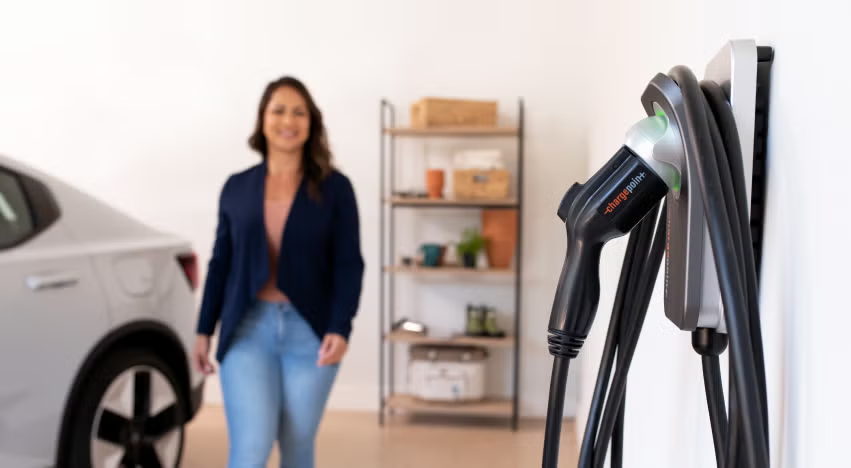
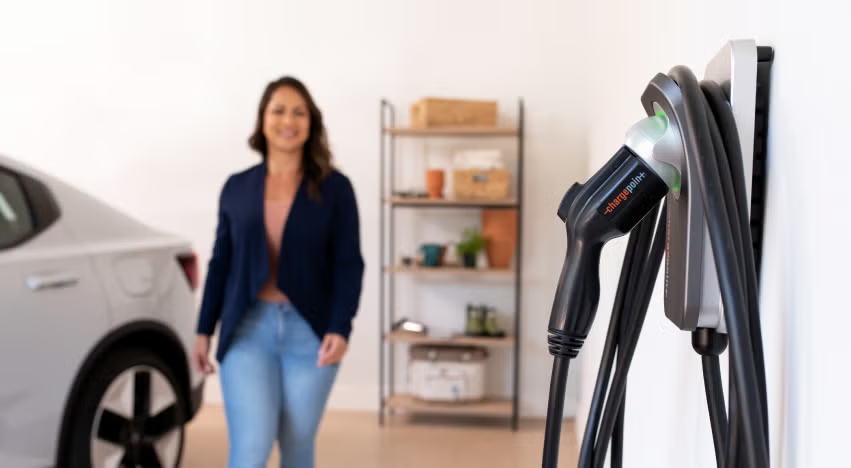
Home charging is convenient until the power goes out. A stalled overnight charge during a storm or heatwave can leave you stranded the next morning. That is where whole-home battery backup becomes useful. It keeps the charger running when the grid fails.
A stalled EV charge leaves you stranded during severe weather. The EcoFlow DELTA Pro Ultra supports your Level 2 charger. It keeps your car powered and essential household circuits running.
Homes running high-amperage EV charging alongside central air conditioning need higher continuous output. The EcoFlow DELTA Pro Ultra X delivers massive capacity to handle heavy household power demands through blackouts.
ChargePoint Home vs. Public Charging
Most EV drivers use a balanced mix of both charging methods. However, charging your car in your own driveway offers unmatched daily convenience.
You plug the cable in when getting home from work in the evening. The car charges quietly overnight while you sleep. Every single morning, you walk out to a full battery pack without standing in lines.
Public ChargePoint electric vehicle charging serves a very different, essential purpose. It acts as a safety net during errands and makes long-distance road trips possible.
Key Tradeoffs to Weigh
Choosing where to plug in involves several everyday factors:
Daily convenience: Home charging takes ten seconds to plug in. Public stations require driving to a commercial lot and waiting around.
Operating expenses: Residential electricity averages around $0.16 per kWh across the US. Public commercial stations often charge double or triple that rate.
Charging speeds: Home Level 2 units deliver power steadily over six to eight hours. Public DC fast stations blast power into your battery in 30 minutes.
Hardware wear: Frequent DC fast charging generates battery heat. Consistent Level 2 charging is much gentler on your battery pack over time.
Feature Comparison | Residential ChargePoint Home Flex | Public ChargePoint Stations |
Typical Electricity Rate | Local utility rate (~$0.12–$0.24/kWh) | Set by host ($0.25–$0.50/kWh or hourly) |
Wait Times | Zero | Variable |
Installation Required | Yes (240V circuit or hardwired setup) | None; drive up and plug in |
Best Use Case | Daily commuting, overnight top-offs | Road trips, apartment living, daytime errands |
When deciding where to plug in, weighing home vs. public EV charging covers the real cost and convenience tradeoffs in more depth.
For anyone relying on public stations, knowing how to actually find and use one matters most.
Finding and Using a ChargePoint Station
Navigating public infrastructure gets easy once you understand digital tools. The interactive ChargePoint map sits right inside the smartphone application and on their website.
The map gives you an overhead view of every operational plug nationwide. It displays color-coded pins so you can identify open stalls at a glance.


Steps for a Smooth Public Charging Stop
Follow these practical steps to avoid headaches when charging away from home:
Check live availability: Look for green icons on the in-app map before driving to a station.
Filter by connector type: Narrow your map results to J1772, CCS, or NACS. This prevents you from pulling up to an incompatible plug.
Review current rates: Read the host's fee schedule, hourly limits, and idle fees in the station card.
Join the virtual waitlist: Popular locations let you queue up digitally through the app. The system alerts you when a spot frees up.
Plug in and authorize: Connect the handle to your car port. Tap your phone or RFID card on the scanner to start current flowing.
Track battery progress: Check charging speeds and battery percentage remotely from your phone. Move your vehicle promptly when finished to dodge idle fees.
If you travel a lot, it pays to look at other networks too. Finding EV charging stations near you covers how different networks fit together and what to expect on longer trips.
Conclusion
ChargePoint operates the largest public charging network in the country. Their unique business model lets independent hosts set their own station pricing. Because of this, rates swing widely between different parking lots. Always check your mobile app for real-time pricing and connector compatibility before pulling into a stall. Installing a dedicated Level 2 home charger remains the most practical and affordable way to handle daily charging.
Pairing your home charger with an EcoFlow DELTA Pro Ultra or EcoFlow DELTA Pro Ultra X protects your household against grid blackouts. You keep your vehicle fueled and your home running, no matter what the weather throws at your neighborhood.
FAQs
How much does it cost to charge at a ChargePoint station?
Prices vary by location because each property host sets their own rates. Some stations are completely free to use. Others charge between $0.20 and $0.45 per kWh, or $1.00 to $3.00 per hour. Always check the mobile app for exact pricing before plugging in.
Does ChargePoint own its charging stations?
No, ChargePoint does not own most of the public charging stations on its network. Business owners, corporations, and municipalities buy and operate physical equipment. ChargePoint supplies the hardware, mobile software platform, and payment processing network.
Is the ChargePoint Home charger worth buying?
Yes, the ChargePoint Home Flex is a reliable Level 2 home charger. It delivers up to 50 amps of charging power, adding up to 37 miles of range per hour. It integrates directly with the main ChargePoint app, allowing you to manage home and public sessions together.
What connector types work with ChargePoint stations?
ChargePoint stations offer standard J1772 connectors for Level 2 charging and CCS1 or CHAdeMO plugs for DC fast charging. Tesla vehicles can connect to Level 2 units using standard adapters, and native NACS connectors are rolling out across the network.
Can I use ChargePoint without the mobile app?
Yes, you can charge without opening the mobile app. You can tap a physical ChargePoint RFID card or key fob against the station reader. You can also add an RFID pass to Apple Wallet or Google Wallet for tap-to-pay charging.
For press requests or interview opportunities, reach out to our media team
media.na@ecoflow.com