SWEPCO Power Outage: How to Check the Outage Map and Status
When the lights go out, the first question is whether the problem affects one house or the surrounding neighborhood. Southwestern Electric Power Company, or SWEPCO, serves customers in parts of Arkansas, Louisiana, and Texas. Its online tools show reported interruptions and, when available, projected restoration times.
The map is only part of the response. Customers also need to know how to report an outage, recognize damage on their side of the service connection, and handle food, appliances, and backup power safely.
How Do You Check the SWEPCO Outage Map and Restoration Status?
The SWEPCO power outage map provides a broad view of active interruptions, while the account page provides address-specific status after sign-in. The distinction matters when a storm affects several communities but one customer needs information about a particular home or business.
Open the Official SWEPCO Outage Map
Start at SWEPCO’s official website rather than a link copied from an old social media post. Choose “View Outage Map” for the regional map or “Check Outage Status” to sign in and review the service address tied to the account.
During a large storm, customer counts and estimates can change quickly. The display draws on automated equipment, customer reports, and crew assessments; it cannot show every damaged component in real time. If cellular data is limited, save the latest status and conserve the phone battery. Keep basic power outage essentials, such as flashlights, a radio, and charged power banks, in one known location before severe weather arrives.
Search for Outages by ZIP Code or Location
To look up a SWEPCO power outage by ZIP code, enter a five- or nine-digit ZIP code on SWEPCO’s real-time outage map, then pan or zoom to the relevant part of the service territory. For the status of an individual account, use “Check Outage Status” and sign in with the user ID associated with that service address.
Map symbols may summarize several reports, and their locations are generally approximate. A nearby marker does not prove that every dark house has the same problem. Customer-owned breakers or service equipment can leave one property without power while the utility line remains energized.
Interpret Outage Map Details and Estimated Restoration Times
For SWEPCO power outages, selecting an outage area may show the number of customers affected, a general location, a reported cause, or an estimated restoration time. Some entries will be incomplete, particularly soon after a storm begins. An estimate is a planning aid, not a guarantee that power will return at that minute.
Outage Information | What It Means | Recommended Action |
Affected Customers | The approximate number of accounts associated with the incident | Determine whether the scale appears limited to a street or extends across the area |
Outage Location | A general representation of the reported interruption | Use it as a regional reference rather than an exact location of damaged equipment |
Estimated Restoration Time | The utility's current projection for completing the work | Plan food storage, charging, and backup power with extra time in reserve |
Reported Cause | A preliminary or confirmed explanation, when one is available | Follow any related safety guidance and expect the cause to be revised after inspection |
Why Restoration Estimates Can Change
An early estimate reflects the damage known at that point. A crew may find a repair as direct as replacing a fuse, or it may discover a broken pole, inaccessible road, or several faults along the same circuit.
Crews may have to wait for lightning to pass, trees to be cleared, floodwater to recede, or responders to secure a crash scene. SWEPCO may revise an estimate as conditions become clearer, and some incidents will not receive one until the damage can be inspected safely.
Restoration proceeds in stages, from facilities serving large groups to distribution lines, neighborhood equipment, and individual service connections. That is why a nearby block may return before yours even when both went out together.
Sign Up for SWEPCO Outage Alerts by Text or Email
Customers can enroll in text or email notifications through the communication-preferences section of their SWEPCO account. Enrollment is required; having an online account alone does not automatically activate outage messages. Standard carrier message or data charges may apply even though SWEPCO does not charge for the alert service.
Add current contact information before storm season and make sure utility messages are not being filtered. Short interruptions may not generate an alert, and a widespread emergency can delay delivery. If the power is out, report it even when no message has arrived.
How Do You Report a SWEPCO Power Outage?
A report helps SWEPCO associate the interruption with the correct meter and circuit. The utility says online reports are processed immediately and monitored around the clock. Reporting is especially important when nearby homes still have power or the outage is absent from the map.
Report an Outage Online or by Phone
Use the “Report an Outage” form for an ordinary loss of service.
For safety hazards and outages:
Call 888-218-3919 for East Texas, Louisiana, and Arkansas.
Call 866-223-8508 for the North Texas Panhandle.
For other customer-service questions:
Call 888-216-3523 (East Texas, LA, AR).
Call 800-723-7430 (North Texas Panhandle).
Call 911 for an immediate threat to life or property, such as a fire or a line on an occupied vehicle. Do not approach for a better look. Give the dispatcher the address, cross street, and what is visible from a safe location.
What to Do if Your Outage Does Not Appear on the Map
A new report may take time to appear, and a single damaged service connection may never look like a large map event. Submit the outage rather than waiting for a symbol to show up. Keep the confirmation information if the website provides it.
From indoors or another safe location, note anything that may help the utility:
Whether the entire home is dark or only certain circuits are affected
Whether nearby homes, streetlights, or businesses still have power
Whether a branch, pole, transformer, or overhead service line appears damaged
Whether there was a flash, pop, burning odor, or unusual brightening and dimming before service failed
Observations are useful; close inspection is not. Stay away from the meter, weatherhead, service-drop wire, pad-mounted transformer, and anything touching a fallen line. Even a wire that looks insulated or lies quietly on the ground may be energized.
Check Whether the Problem Is Limited to Your Home
If nearby homes have power, the problem may be limited to your property or service connection. Look at the main panel only when the floor, panel, and surrounding area are dry and there is no sign of fire or damage. A tripped breaker may rest between the ON and OFF positions, depending on the model. Follow the panel manufacturer’s instructions if checking it is safe. If a breaker trips again after being reset, leave it off and call a licensed electrician.
Customers in apartments, mobile homes, condominiums, and other multi-unit properties may have an external breaker near the meter in addition to the panel inside. That equipment may be locked or controlled by building management. Contact maintenance rather than opening an enclosure or defeating a lock.
Storm damage to a weatherhead, mast, meter base, or service entrance may be the owner’s responsibility. If customer-side equipment is damaged or unsafe, a licensed electrician may need to complete repairs before power can be restored. Contact SWEPCO to clarify whether the problem is on the utility’s side or the property’s side of the service connection.
How Can You Prepare for a SWEPCO Power Outage?
Useful preparation is modest: charged lights, drinking water, appliance thermometers, and a written list of essential electrical loads. A portable power station can form part of the plan for compatible devices when its output and capacity match the intended loads.
Before severe weather, locate the flashlights and electrical panel, charge phones and battery packs, and test smoke and carbon monoxide alarms.
Prepare for Electrical Hazards Before an Outage
If an outage occurs, turn off or unplug electronics and appliances that do not need to remain connected. This reduces the chance of damage when service returns and prevents several high-demand devices from starting at once. Leave one lamp switched on as a simple indication that utility power is back.
Do not approach a panel that is wet, damaged, hot, or buzzing. When electrical conditions seem abnormal, keep away and ask SWEPCO or an electrician for guidance.
Safety Note: Treat every fallen wire as energized. Stay well back, keep other people and pets away, and avoid fences, puddles, vehicles, branches, or other objects in contact with the line. Call 911 for immediate danger and report the hazard to SWEPCO. Never try to move a wire with a tool, rope, or piece of lumber.
An engine-driven generator belongs outdoors, at least 20 feet from doors, windows, and vents, with its exhaust directed away from buildings. A garage is unsafe even with the door raised. Use carbon monoxide alarms and follow the manufacturer’s instructions.
Keep Essential Appliances Running During an Outage
Begin with a load list. Record the running wattage of refrigeration, lights, internet equipment, and heating controls. Motors can draw more at startup, so the power source must handle both surge and steady demand. Runtime depends on energy capacity, not output wattage alone.
For essential 120V household loads, EcoFlow lists the EcoFlow TITAN 5000 Classic with 5 kWh of base capacity and 4,000 watts of rated AC output. The manufacturer says compatible extra batteries can expand the system to 30 kWh. The Classic supplies 120-volt power; it does not directly operate 240-volt equipment such as a conventional central air conditioner or electric water heater.
Inverter losses, standby use, temperature, and appliance cycling all affect runtime. Test intended loads before an emergency, and verify the voltage, frequency, starting demand, and compatibility of each essential device.
Keep battery equipment dry and its vents clear. Never connect a portable power source to a wall receptacle with a double-male cord; it can energize wiring unexpectedly, start a fire, and endanger utility workers.
Plan Home Backup Power for Longer Outages
A multiday outage calls for an energy budget. Refrigeration, communication, and LED lighting generally take priority. Resistance heaters, water heaters, dryers, and ranges can deplete stored energy quickly, so decide which loads can remain off.
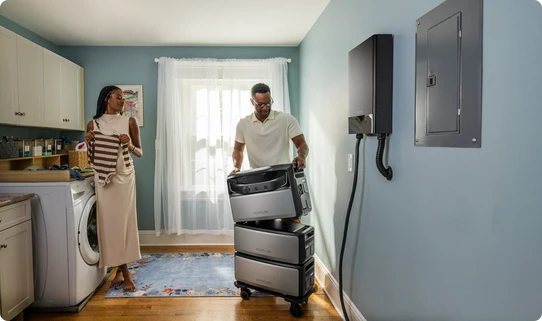
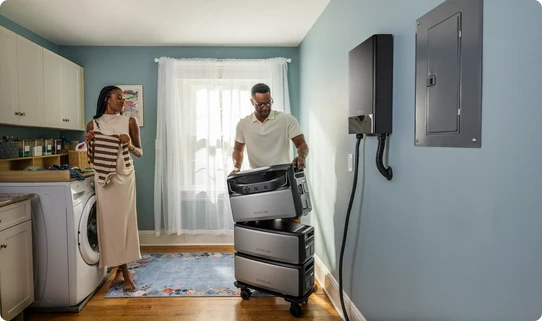
For customers considering selected-circuit backup, EcoFlow specifies the EcoFlow TITAN 5000 Plus at 5 kWh of base capacity, expandable to 30 kWh, with 7,200 watts of rated 120/240-volt split-phase output. When paired with the compatible Smart Home Panel 10, the system can serve as many as 10 selected circuits and is rated for a transfer time of within 20 milliseconds. Routing backup power to selected 120V/240V household circuits requires a compatible EcoFlow Smart Home Panel 10. The panel and household wiring must be installed by a qualified electrician according to the equipment instructions and applicable local electrical codes.
Actual runtime and appliance support depend on the installed battery capacity, the combined load of the connected circuits, and each appliance’s running and starting requirements. Motor-driven equipment such as pumps or HVAC systems should be checked carefully before being included in the backup plan.
What Should You Do After SWEPCO Restores Your Power?
The return of the lights does not guarantee that every part of the system is normal. Service may come back in sections or be interrupted again while repairs continue. Check the house before restoring every appliance.
Check Appliances and Electronics After Power Is Restored
Confirm that lighting appears normal. If bulbs become unusually bright or dim, 240-volt appliances fail, or power is present in only part of the house, disconnect sensitive equipment and report the condition. Those signs can point to a service problem that should not be ignored.
Reconnect large loads gradually. Begin with essential equipment, then restore the air conditioner, electric water heater, range, and other high-demand appliances one at a time. Check clocks, thermostats, garage-door openers, security systems, and irrigation controllers; many will need to be reset even if they were not damaged.
Listen for buzzing, note any overheated odor, and look for water near electrical equipment. A scorched outlet, hot panel, repeated breaker trip, or damaged cord requires professional attention.
Inspect Food for Safety in Your Refrigerator and Freezer
Power outage food safety depends on time and temperature rather than smell or appearance alone. Keep the refrigerator and freezer doors closed until you are ready to evaluate the food. An unopened refrigerator generally keeps food cold for about four hours. A full freezer that remains unopened can maintain its temperature for roughly 48 hours, while a half-full freezer may hold it for about 24 hours, provided the door remains shut.
Use an appliance or food thermometer rather than smell or taste. Perishable refrigerated food that has been above 40°F for two hours or longer should be discarded. Frozen food that still contains ice crystals or measures 40°F or below can generally be refrozen, although its texture may suffer.
When time or temperature is unknown, follow the USDA’s food-specific guidance and err on the side of safety. Photograph discarded food if the loss may be submitted to an insurer.
Check and Recharge Your Backup Power System
Once utility service appears stable, recharge the home battery to the emergency-ready level recommended by its manufacturer. Inspect plugs, cables, adapters, and ventilation openings while the equipment is cool and dry. A swollen case, damaged connector, unusual odor, or error that returns after a restart warrants manufacturer support rather than continued use.
Review the outage while details are fresh. Correct cord, runtime, or load-priority problems before the next storm, and store labeled cables and the manual with the unit.


Conclusion
Report the interruption, use SWEPCO’s official map or account page for updates, and remember that restoration estimates can change after crews inspect the damage. If only one property is affected, check accessible breakers under safe conditions and seek professional help for damaged service equipment.
Protect people from downed lines and carbon monoxide, keep appliance doors closed, and size backup power around essential loads. When service returns, reconnect equipment gradually and watch for abnormal voltage, heat, odors, or repeated breaker trips.
FAQ
What to Do if Only Half Your House Has Power?
Partial power can have several causes. A tripped branch breaker may affect only a few rooms, while the loss of one leg of a typical 120/240-volt service can disable a larger group of 120-volt circuits and prevent 240-volt appliances from working. A loose or failed neutral is especially concerning because it can make some lights unusually bright while others become dim.
Unplug sensitive equipment if voltage appears unstable and report the condition to SWEPCO. The utility or a licensed electrician can determine which side of the service connection is responsible; do not open service equipment yourself.
How Accurate Are Outage Maps?
An outage map is a current operational summary, not a minute-by-minute photograph of every line and transformer. It can be very helpful for understanding the scale and general location of an event, but customer counts, causes, boundaries, and restoration projections may change as new reports arrive and crews inspect the system.
Use the map for planning, then compare it with account alerts and SWEPCO’s storm updates. If your service is out and the map does not show it, submit a report.
Is There a Device That Notifies You When Power Goes Out?
Yes. Plug-in power-failure alarms can sound locally, while some Wi-Fi or cellular monitors can send a remote notification. A Wi-Fi model needs backup power for the modem and router and may not communicate if the internet provider is also down. Cellular products depend on their own battery, service plan, and local network coverage.
SWEPCO’s text and email alerts are another option when enabled. Households with critical loads should still follow a dedicated outage plan rather than relying on one message.
Will Insurance Cover Spoiled Food from Power Outage?
It depends on the policy and why the power failed. Some homeowners and renters policies include limited coverage for refrigerated food after a covered loss, while others exclude utility interruptions that begin away from the insured property. A deductible may also be higher than the value of the food.
Check the policy or call the insurer before assuming the loss is covered. Record the outage dates, photograph discarded items, and keep an itemized estimate of their value. Do not keep unsafe food solely as evidence; ask the insurer what documentation it requires.
For press requests or interview opportunities, reach out to our media team
media.na@ecoflow.com