Lightning Strike Map: Track Lightning Activity and Strikes Near You
When a thunderstorm is still a few towns away, the sky outside may tell you very little. A lightning map fills in part of the picture. It shows where electrical activity has been detected and whether that activity is edging closer to home.
That is useful before a hike, a kid’s game, or an afternoon of yard work. Just do not read an empty patch of map as a promise of safety. Detection points are estimates, some appear late, and lightning can jump beyond the main area of rain. The trick is knowing which details matter and when to stop watching the screen and head indoors.
What Is a Lightning Strike Map?
A lightning strike map displays recently detected electrical activity. Some services plot separate cloud-to-ground strikes. Others include lightning within clouds or show total activity across a wider area.
Lightning data may come from ground-based detection networks, weather satellites, or products that combine multiple data sources. Ground networks use signals detected at multiple sensors to estimate a discharge’s location, while NOAA’s Geostationary Lightning Mapper (GLM) detects total lightning from GOES satellites. Since these systems measure different things, check the legend before treating a marker as an exact impact point.
How Can You Track Lightning Strikes Near You?
Live maps, radar apps, and location alerts can all help. Lightning layers show electrical activity, while radar loops give a better sense of direction. A lightning strike map near me search can provide a quick view of recently detected activity around your location, while radar loops give a better sense of storm movement.
Find Live Lightning Maps and Trackers
Several well-known services are available on desktop and mobile devices:
Blitzortung.org: This community network gathers near-real-time information from volunteer sensors. Coverage varies with the number of receivers in an area.
LightningMaps.org: Built with Blitzortung data, it provides an animated view of recent detections. Expanding circles illustrate the estimated travel of thunder, not a safety countdown.
Weather Underground and RadarOmega: Weather Underground’s WunderMap includes lightning alongside radar. RadarOmega also combines the two, although some features may require payment.
Community maps are helpful for awareness, but they should not replace National Weather Service warnings.
Check Historical or Recent Strikes in Your Area
Run the map back 15 or 30 minutes and watch how the pattern changes. A steady trail of markers may show the storm’s general direction. Repeated activity in one area can mean new cells are developing there. Available history and strike totals vary by platform.
Set Up Instant Proximity Alerts
Apps such as My Lightning Tracker and CARROT Weather can send notifications for saved locations. Some local emergency-management agencies offer app or text alerts as well.
Check the settings before storms arrive. An alert radius is not a safety boundary, and poor cellular service can delay a message. Do not wait for an app notification before acting on signs of a nearby storm. Keeping phones and other communication devices charged from a portable power station can also help maintain access to alerts if a storm disrupts utility power.
Track Storm Movement and Direction
Turn on the radar loop and lightning layer together, then watch several frames. Tracking thunder and lightning activity alongside radar can provide more context for how an active storm is developing and moving. Storms may slow down, split, or develop on a new side, so past movement is not a promise. During a severe thunderstorm, use the map for situational awareness and follow any official alerts for your area.
How Do You Read a Lightning Strike Map?
Lightning maps use markers, colors, timestamps, and shaded areas to organize recent detections. Symbols and color scales vary between services, so the same marker may mean different things on different maps.
Feature | Visual Representation | What It Indicates | Practical Action |
New Strikes | Bright, flashing, or newly added markers | Lightning detected in the newest time window | If it is near you or thunder is audible, seek shelter |
Aging Strikes | Faded markers or changing colors | Earlier activity and the storm’s recent path | Watch the trend, but do not treat it as an all-clear |
CG Discharge | Bolt, cross, or polarity symbol | An estimated cloud-to-ground event | Treat the plotted location as approximate |
IC Discharge | Dot, circle, separate color, or shaded area | Lightning within or between clouds | Remember that the storm may also produce ground strikes |
Dense Cluster | Overlapping markers or bright shading | Frequent lightning during the selected period | Check radar and official warnings for other hazards |
Decode Lightning Strike Symbols and Colors
Many maps make new activity bright and allow older markers to fade. One common pattern is:
White/Flashing Red: Often marks the newest detections.
Orange/Yellow: May show activity from an earlier part of the displayed period.
Deep Red/Purple/Gray: Often represents older detections that will soon disappear.
Another app may reverse the order. Check the legend and time range.
Cloud-to-Ground vs. Intra-Cloud Lightning
Not every flash reaches the ground, but both types signal an active thunderstorm.
Cloud-to-Ground (CG): The electrical channel connects with the ground. These strikes can injure people, damage trees and buildings, start fires, and send surges through utility lines. Plus and minus symbols usually refer to polarity, not the level of danger.
Intra-Cloud (IC): The discharge remains within a cloud or travels between clouds. A rapid increase in total lightning can accompany a strengthening storm, but it does not prove that severe weather is developing.
“Sheet lightning” describes a broad glow seen through clouds. It is an appearance, not a separate type of lightning.
Read Strike Timestamps and Age Indicators
A timestamp needs a quick second look. Some maps use local time; others default to Coordinated Universal Time (UTC). Depending on the service, tapping a marker may also bring up polarity, discharge type, or an estimated peak current. None of that pinpoints the tree, house, or utility pole that was hit. It reflects what the network calculated from the signal.
Interpret Lightning Strike Density
A tight cluster means frequent lightning was detected during the selected period. It may line up with an active storm core, but it does not confirm hail, a microburst, or damaging wind. Even a storm with scattered markers can produce a dangerous strike.
How Can You Prepare for Thunderstorm-Related Power Outages?
A thunderstorm does not need to hit your house directly to turn off the lights. A limb across a line or wind-damaged equipment can black out one street or a much larger area. A little work beforehand pays off whether service returns quickly or crews are out most of the night. Good home safety preparation for electrical storms starts with monitoring alerts, identifying essential devices, and planning for possible power loss.
Monitor Local Storm and Power Outage Alerts
Keep National Weather Service alerts enabled and sign up for notifications from your electric utility. Before storm season, confirm that the utility has your current phone number and email address.
An outage map may show the affected area and an estimated restoration time, although that estimate can change. Charge your phone early. A battery-powered NOAA Weather Radio offers another source of information if service fails. If outages are common in your area, a solar battery can also form part of a longer-term plan for keeping selected essentials powered.
Identify Essential Home Devices to Keep Powered
Start with the devices that protect health, food, communication, and basic safety:
Refrigeration: A refrigerator or freezer protects food, but its compressor may briefly draw more power when starting.
Communication & Work: Phones, laptops, modems, and Wi-Fi routers provide access to family, work, alerts, and utility updates.
Medical Devices: CPAP machines and other powered medical equipment need a backup plan based on the user’s needs and manufacturer instructions.
Basic Comfort & Safety: LED lights, fans, and aquarium equipment may also be household priorities.
Check each device’s label for its rated power and note how many hours of backup it actually needs.
Choose Backup Power for Essential Devices
Add up the equipment you expect to use at the same time. Leave room for the startup demand of appliances with motors or compressors.
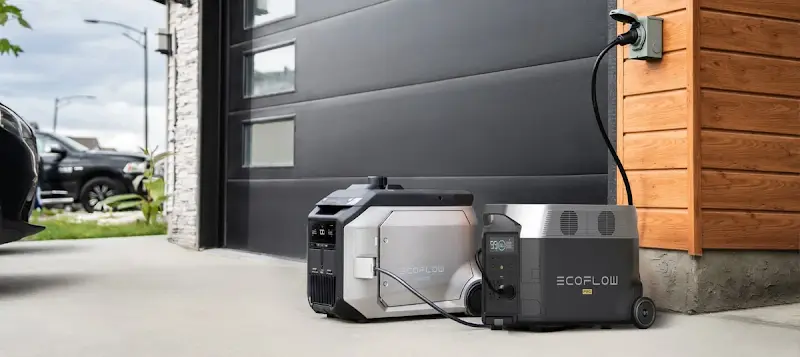
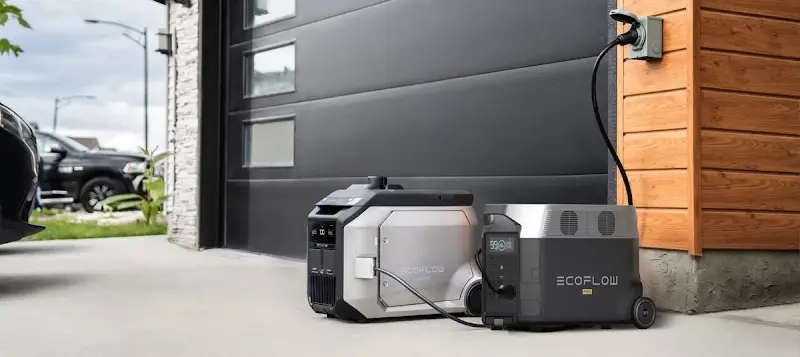
The EcoFlow DELTA 3 Max Portable Power Station can support several essentials, such as a refrigerator, lights, phones, and networking equipment, depending on the load. It runs from a battery and produces no engine exhaust while supplying power. Keep it dry and follow the instructions.
A portable power station normally supplies devices plugged directly into it. Powering hardwired circuits requires compatible equipment and, when applicable, professional installation.
Plan for Longer Power Outages
Once an outage lasts more than a few hours, decide what deserves battery time. A refrigerator may need periodic power; an idle laptop or spare lamp does not. Think about recharging as well, but do not count on setting up outdoor equipment while the storm is still overhead.
For longer outages, the EcoFlow DELTA Pro Portable Power Station can serve as the core of an expandable backup setup, with additional compatible equipment increasing the available capacity. It also supports multiple recharging options, including AC and solar.
How Can You Stay Safe When Lightning Is Nearby?
If you hear thunder, move into a substantial building or an enclosed, metal-topped vehicle. Do not wait for a map notification.
Go Indoors When Thunder Roars
The National Weather Service’s advice has lasted because nobody has to decode it: “When Thunder Roars, Go Indoors.”
Do not wait for rain. A bolt can come from the outer edge of a storm, where the sky may not look especially threatening. After the last rumble, give it another 30 minutes before heading outside. If thunder returns, start the count again.
Choose a Safe Building or Vehicle for Shelter
A substantial enclosed building with plumbing or electricity is the safest choice. Tents, gazebos, picnic shelters, dugouts, and carports are not safe.
If no suitable building is nearby, use an enclosed, metal-topped vehicle with the windows closed. The metal body carries current around the passenger compartment. Rubber tires are not what protect you. Avoid touching exposed metal inside the vehicle.
Avoid Indoor Electrical Hazards During a Thunderstorm
Being in the house is safer, but it does not make every activity a good idea. Lightning can travel along wiring, pipes, phone lines, antennas, and metal inside concrete. Leave the shower and dishes for later. Avoid corded phones, plugged-in appliances, porches, and exterior windows.
If electronics need to be disconnected, do it while the storm is still distant. Once thunder is nearby, do not reach for the cords. A standard power strip may handle everyday surges; it is not dependable protection from a lightning strike.


Conclusion
Lightning maps are good at answering one modest question: Where has the storm been active lately? That may buy you time to stop a game, bring tools inside, or move people away from the water. It cannot tell you where the next bolt will land.
Pair the map with radar and National Weather Service warnings. When thunder is audible, the decision has already been made. Get inside and stay there until 30 minutes after the last rumble. If power loss is common where you live, keep alerts on, devices charged, and a backup plan ready before the clouds build.
FAQ
Are Lightning Strike Maps Accurate?
Useful, yes. Exact, no. The result depends on what the network detects, how closely its sensors are spaced, and whether the map includes ground strikes, in-cloud lightning, or both.
The U.S. National Lightning Detection Network generally locates cloud-to-ground activity more precisely than a community network. GLM looks at total lightning across a broader area. In either case, plotted locations should be treated as estimates rather than exact strike coordinates.
Can Lightning Destroy Your Electronics?
Yes. A bolt may hit the building, but it can also land nearby and send a surge in through power, telephone, or cable lines. Damage often shows up in circuit boards. A router, television, charger, or appliance may fail even though it was nowhere near the strike point.
A whole-home surge protector lowers the risk; it does not make the house lightning-proof. Unplug equipment before the storm arrives if you want it physically disconnected. Once thunder is close, leave the cords alone.
Is There a 10-Mile Rule for Seeing Lightning?
For the public, no single 10-mile rule replaces the sound of thunder. Some schools, pools, and athletic programs use a 10-mile radius in their site plans, which helps staff move a group to shelter before the storm is overhead.
At home or on the trail, the National Weather Service rule is easier: If thunder is audible, go inside. Lightning can strike 10 miles or more from the storm, so do not let the circle on an app overrule what you can hear.
What Happens Right Before a Lightning Strike?
Usually, nothing obvious happens. People sometimes report hair lifting, tingling skin, or a buzzing sound from metal when the electric field becomes very strong. Those signs are serious, but they do not come before every strike and may leave almost no time to react.
The safer warning is thunder itself. Get into a substantial building or an enclosed, metal-topped vehicle as soon as you hear it. If static signs appear while you are still outside, move immediately.
For press requests or interview opportunities, reach out to our media team
media.na@ecoflow.com