Electricity Usage Monitor: How It Works and How to Choose One
An electric bill can climb even when household routines seem unchanged. A refrigerator may be cycling more often, an air conditioner may be running longer, or electronics may be drawing power around the clock. The monthly total confirms higher use but rarely explains it.
An electricity usage monitor fills in that missing detail. Depending on the model, it can measure one plug-in appliance, selected circuits, or the home’s total electrical demand. The useful part is not simply watching a wattage number change. It is collecting enough information to separate normal operation from avoidable waste and then deciding which changes are worth making.
What Is an Electricity Usage Monitor and How Does It Work?
An electricity monitor measures power as it is being used and records consumption over time. Some units sit between an appliance and a wall outlet. Others use sensors in the electrical panel to observe the current serving the entire home or individual circuits.
The monitor does not lower consumption by itself. It shows how much an appliance draws, what it uses during a full cycle, and when household demand is highest.
Definition of an Electricity Usage Monitor
An electricity power usage monitor is a meter or sensor system that tracks electrical demand for a device, circuit, or building. A real-time display usually reports power in watts. Historical screens report energy in kilowatt-hours, the same basic unit used on an electric bill.
Many monitors estimate cost after the user enters an electricity price. Recent national residential data have been close to 18 cents per kWh, but rates vary substantially. Time-of-Use customers may pay several prices in one day, so the actual utility plan is more useful than a national average.
Consumer monitors are diagnostic tools, not necessarily revenue-grade meters. Their totals may differ slightly from the utility’s because of sensor accuracy, sampling, voltage assumptions, or data gaps.
How Monitors Measure Electricity Use
Electrical power depends on voltage and current. Standard U.S. receptacles generally supply 120V, while many dryers, ranges, water heaters, central air conditioners, and EV chargers use 240V. Current, measured in amperes, describes the flow through a conductor.
A plug-in monitor can measure both voltage and current at the receptacle. It may also account for power factor, which matters with motors, switching power supplies, and other loads where multiplying volts by amps alone does not equal real power in watts.
Whole-home monitors use clamp-on current transformers, or CTs, around service or branch-circuit conductors. A CT senses the magnetic field created by current. Some systems measure voltage directly; others use a reference or nominal value, which can affect accuracy.
How Monitors Track Energy Use
Watts describe power at a moment in time. Kilowatt-hours describe energy accumulated over time. A 1,000W appliance operating steadily for one hour uses 1 kWh; the same appliance running for 15 minutes uses 0.25 kWh. To calculate power needs for an individual device, start with its wattage and expected runtime.
Monitors take repeated readings and add them together. Basic plug-in meters show the running total on an LCD screen. Connected models send readings to an app, where the user may review hourly demand, daily consumption, estimated cost, and longer-term trends.
When you monitor electricity usage, match the measurement period to the appliance. A lamp can be understood quickly because its load is constant. Refrigerators, dehumidifiers, pumps, and air conditioners cycle, so they should be monitored for several normal days.
What Are the Different Types of Electricity Usage Monitors?
The common choices are plug-in meters, panel systems, and monitoring smart plugs. A plug-in meter is specific, a panel monitor shows household patterns, and a smart plug adds remote control and scheduling.
Monitor Type | Installation | Tracking Scope | Best For | Typical Price |
Plug-In Monitor | Plug into outlet | Single 120V appliance | Renters; checking refrigerators, TVs, computers, or dehumidifiers | $15–$40 |
Whole-Home Panel Monitor | Electrician recommended | Whole home and individual circuits | HVAC, EV charging, water heaters, solar | $100–$350 |
Smart Plug with Monitoring | Plug in and connect to Wi-Fi | Single appliance | Remote monitoring and scheduling | $10–$25 per plug |
Note: The prices listed are approximate US market estimates and may vary by brand, model, features, and retailer.
Plug-In Electricity Usage Monitors
A plug-in meter connects to a standard 120V receptacle, and the appliance plugs into the meter. Basic plug-in meters usually require no panel work or permanent installation, and models with a built-in display can work without an account. They are useful for refrigerators, televisions, computers, portable dehumidifiers, and other cord-connected appliances.
It cannot measure hardwired loads or typical 240V equipment such as central air conditioners, ranges, water heaters, or dryers. Confirm the meter’s voltage, current, and wattage ratings before connecting a large load.
Portable electric heaters deserve particular care. Safety guidance generally calls for plugging them directly into a wall outlet, not through an extension cord, power strip, or unapproved adapter. Do not place a plug-in monitor between a heater and the outlet unless both manufacturers explicitly permit that arrangement and the meter is properly rated.
Whole-Home Electricity Usage Monitors
A whole-home monitor places CT sensors around the main service conductors inside or near the breaker panel. Many systems can accept additional sensors for selected circuits, allowing the homeowner to separate an EV charger, heat pump, water heater, pool pump, or solar system from the rest of the house. If your system includes a solar battery, check whether the monitor can show its charging and discharging separately from household load.
Some products estimate appliances from changes in the home’s electrical signature. The method can identify distinctive loads, but similar devices may be confused, and variable-speed equipment can be difficult to recognize.
Service conductors may remain energized even with the main breaker off, and a crowded panel leaves little room for mistakes. Professional installation is the sensible choice unless the instructions and local rules clearly permit another method.
Smart Plugs with Energy Monitoring
A monitoring smart plug combines a small power meter with remote switching. Its app may display current wattage, daily or monthly energy, operating time, and a schedule. That makes it convenient for lamps, entertainment equipment, office electronics, and other loads a user may also want to control remotely.
Check the plug’s amperage and wattage limits, including any restrictions for motors or other inductive loads. A 15A label does not mean every 15A appliance is appropriate in every situation. Refrigerators and pumps can have startup surges, and many heating appliances should connect directly to a wall outlet rather than be controlled through a smart plug.
Some products depend on cloud service for history, alerts, or schedules. Check what works without internet access, how long data is retained, whether it can be exported, and whether useful features require a subscription.


How to Choose the Right Electricity Usage Monitor
To decide how to monitor electricity usage, start with the question you want answered. A panel system is unnecessary for one refrigerator, while a plug-in meter cannot compare whole-home air-conditioning demand with rooftop solar production. The hardware must also suit the service, panel, conductors, appliance load, and installation method.
Select a Monitor Based on Your Energy Tracking Needs
For one cord-connected appliance, a plug-in monitor is usually the simplest choice. Leave it connected long enough to capture a representative cycle before comparing the result with manufacturer data or a possible replacement.
A whole-home monitor is more useful when the problem is broad or changes by time of day. It can show when the home reaches its daily peak, how much base load remains overnight, and whether heating, cooling, water heating, or EV charging dominates consumption. Circuit-level sensors provide the most direct detail for hardwired equipment.
Smart plugs make sense when remote control is part of the goal. They work well for devices that can be switched safely and do not need to remain on continuously. Avoid using remote switching on equipment whose manufacturer requires a direct or uninterrupted connection.
Check Electrical Compatibility and Installation Requirements
Before ordering a panel monitor, review the service and enclosure rather than assuming every kit fits every American home:
Panel Type and Space: Confirm that the panel has enough room for the required CT clamps, leads, and any voltage-sensing connection without interfering with the cover or other wiring. Crowded main panels and subpanels may need a different sensor arrangement.
Split-Phase 120V/240V Support: Most U.S. homes use split-phase service with two hot legs. A whole-home system generally needs to monitor both legs to calculate total demand and represent 240V loads correctly.
Safety Certifications: Look for a certification mark from a recognized testing laboratory that applies to the product and its intended use. A mark is more meaningful than a seller merely describing a device as “tested.”
Homes with rooftop solar, a home battery, a generator, multiple subpanels, or more than one service entrance need additional planning. The sensor locations determine whether the app reports grid imports, solar production, battery flow, household load, or an incomplete combination of those values.
Evaluate Monitoring Accuracy and Data Features
Manufacturers may advertise ±1% to ±2% accuracy, which is generally adequate for household diagnostics when the claim applies across the load range you expect to measure. Accuracy at a moderate load does not guarantee the same performance at very low standby power. Sensor placement and installation also affect the result.
Fast updates help identify sudden changes, but consistent historical data is usually more valuable for cost analysis than a rapidly changing gauge.
Look for daily, weekly, monthly, and annual views; circuit comparison; cost-rate settings; alerts; and exportable data. Time-of-Use customers need more than one electricity rate and the ability to assign those rates to the correct hours, weekdays, weekends, or seasons.
Local storage and CSV export reduce dependence on a vendor’s cloud. Otherwise, review retention, subscription terms, account security, and what happens if the service ends.
Consider Purchase Costs and Ongoing Fees
Hardware is only the starting cost. A panel system may need additional CTs, a gateway, or professional installation, while a lower-priced monitor may charge recurring fees for history or exports.
Do not assume a fixed payback period. Savings depend on what the monitor finds and whether the household can act. Discovering a failed seal or unnecessary overnight load may cut costs quickly; confirming normal operation may not.
Replacing a working appliance to save a small amount of electricity may have a long payback. Monitoring improves the estimate; it does not make every upgrade worthwhile.

How Can an Electricity Usage Monitor Help Reduce Energy Costs?
A monitor turns an unexplained monthly total into specific patterns. It may reveal an appliance that runs too often, a high overnight base load, or a daily peak that falls inside the utility’s most expensive rate window. The next step is deciding which changes preserve comfort and convenience while reducing unnecessary use.
Identify Energy-Hungry Appliances
Large appliances should be measured over a representative period. A refrigerator may draw several times more power when its compressor starts than when it is idle, and defrost cycles can add occasional loads. Recording at least a few ordinary days gives a better estimate than multiplying one instantaneous reading by 24 hours.
Compare measured kilowatt-hours with the appliance’s age, condition, and expected performance. A rising refrigerator total may point to dirty coils, damaged door seals, poor ventilation, a colder-than-needed temperature setting, or a failing component. An air conditioner that runs unusually long may have an airflow, maintenance, insulation, or sizing problem rather than simply being “energy hungry.”
Before replacing equipment, calculate the difference between current use and the likely use of the proposed replacement. Multiply that annual kWh difference by the local electricity rate, then compare the result with the purchase and installation cost.
Detect Standby Power Consumption
Some electronics continue using power while they appear to be off. Displays, network connections, remote-control receivers, chargers, cable equipment, game consoles, and entertainment systems can all contribute to standby demand. To see how much standby draw contributes to TV power consumption, compare readings in standby and during normal viewing.
A monitor with suitable low-power resolution can measure those loads. If an entertainment setup draws 45W continuously, for example, it uses about 394 kWh in a year. The dollar cost depends on the utility rate. More importantly, the measurement shows whether switching selected equipment off at a power strip or smart plug would make a meaningful difference.
Not every standby load should be eliminated. Routers, security equipment, refrigerator controls, sump systems, and products that require updates or safe shutdown may need continuous power. Focus on devices that can be disconnected without creating another problem.
Optimize Electricity Use Based on Consumption Patterns
Monitoring also shows when a household uses the most electricity, which is particularly useful under a time-of-use plan that charges more during the household’s peak-use hours. The monitor can identify loads that are practical to move, such as EV charging, laundry, dishwashing, or selected water-heating schedules. It cannot shift those loads by itself.
The EcoFlow DELTA 3 Max Plus Portable Power Station offers a 2,048Wh base capacity, expandable to 10kWh with extra batteries, allowing households to store electricity during off-peak hours and use it when rates rise. Its TOU mode supports scheduled charging and discharging, while OASIS 3.0 in the EcoFlow App displays electricity rates, battery status, and estimated savings to help manage energy costs.
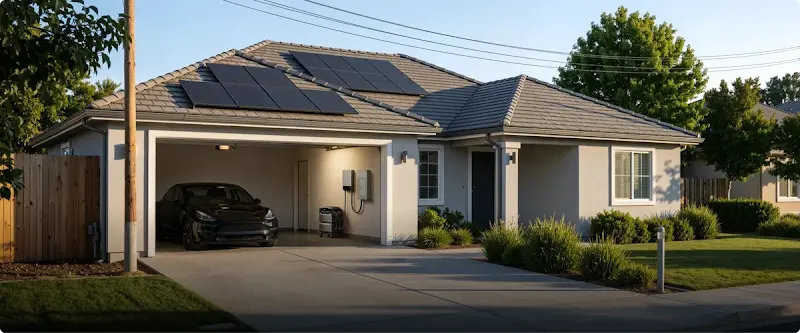
For homes with rooftop solar, storing excess daytime generation can further reduce grid purchases after sunset. The EcoFlow TITAN 5000 Plus offers 5kWh of storage, expandable to 30kWh, with up to 8kW of solar input. Its OASIS 3.0 energy management uses household consumption patterns and solar forecasts to optimize battery operation. Paired with the Smart Home Panel 10, it can manage up to 10 household circuits, helping homeowners use stored solar energy during the evening instead of relying entirely on grid electricity. Installation of the Smart Home Panel 10 requires a qualified electrician to integrate it with the home’s existing electrical panel and supply power to selected 120V and 240V household circuits.
Battery storage changes when electricity is drawn from the grid; it does not make the underlying household load disappear. The value depends on the difference between peak and off-peak prices, solar-export rules, available storage, charging losses, and how consistently the household can follow the schedule.
Conclusion
An electricity usage monitor is most useful when it answers a defined question. A plug-in meter can measure one refrigerator or computer setup. A smart plug adds scheduling and remote control for compatible loads. A whole-home system shows broader patterns and can track hardwired equipment when the correct sensors are installed.
Choose a monitor that matches the electrical service and the level of detail needed. Check its load rating, certification, accuracy range, installation requirements, data access, and ongoing fees.
Then collect enough information to capture normal operating cycles instead of reacting to one unusually high reading. The data can reveal wasted standby power, an appliance that is running too often, or expensive demand during peak-rate hours. The savings come from the decisions made afterward: repairing a problem, changing a schedule, improving efficiency, or using stored energy at a more favorable time.
FAQ
How Long Should You Monitor an Appliance's Electricity Usage?
You should monitor most household appliances for at least 7 full days to capture an accurate picture of their real-world energy consumption. While steady-load devices like lamps or space heaters show reliable numbers within a few hours, cycling appliances—such as refrigerators, sump pumps, dehumidifiers, and washing machines—vary significantly depending on ambient room temperature, door openings, and weekly laundry habits. Tracking across a full week smooths out daily anomalies and gives you a dependable baseline for calculating monthly and annual operating costs.
How Accurate Are Home Electricity Usage Monitors?
Some residential electricity usage monitors specify measurement accuracy within ±2% compared with utility meter readings. However, accuracy varies by device and measurement conditions, so check the manufacturer’s specifications rather than assuming all monitors meet this range. Plug-in monitors and smart plugs also vary in measurement accuracy, so check the manufacturer’s published specifications rather than assuming all models meet the same accuracy standard. UL or ETL listing can help verify electrical safety, but it does not guarantee measurement accuracy.
Do Electricity Usage Monitors Increase Electricity Consumption?
Electricity usage monitors generally consume a small amount of power themselves—often around 0.5 to 2 watts, which may add roughly $0.70 to $3.00 per year to a standard U.S. electric bill, depending on electricity rates and usage. A basic LCD plug-in meter may draw less than half a watt, while a Wi-Fi-connected whole-home monitor with multiple sensors may use around 1.5 to 2 watts continuously. Identifying unnecessary standby loads from an entertainment center or inefficient appliances, such as a space heater, could potentially save $50 to $150 annually, depending on usage patterns. In many cases, these savings can outweigh the monitor’s own electricity costs.
What Should You Do If Your Electricity Usage Monitor Stops Working?
Start by checking the physical power connection, circuit breaker, or Wi-Fi signal before assuming the hardware has failed. Follow these quick troubleshooting steps:
For Plug-In Monitors: Unplug the appliance, test the wall outlet with a known working lamp, and press the recessed Reset button on the monitor face with a paperclip to clear frozen LCD screens or reset accumulated data.
For Smart Plugs and Wi-Fi Monitors: Confirm your router is broadcasting on a 2.4 GHz Wi-Fi band (most smart energy devices cannot connect to 5 GHz networks) and power-cycle the unit.
For Breaker Panel Monitors: Check that the dedicated breaker powering the monitor hub has not tripped, and verify that all CT sensor plugs are seated firmly into the main module. If a panel monitor still fails to power on, contact the manufacturer for warranty support or consult a licensed electrician rather than probing inside the panel yourself.
For press requests or interview opportunities, reach out to our media team
media.na@ecoflow.com