Smart Home Devices: How to Build a Smarter and More Resilient Home
- What Are Smart Home Devices and How Do They Work?
- Most Useful Smart Home Devices for Canadian Homes
- How Smart Home Automation Devices Work Together
- What Happens to Smart Home Devices During a Power or Internet Outage?
- Which Smart Home Devices Should You Back Up First?
- When Does a Smart Home Need Whole-Home Backup?
- How to Choose Compatible Smart Home Devices
- How to Make a Smart Home More Outage-Ready
- Conclusion
- Frequently Asked Questions
More households now use smart home devices for everyday jobs such as controlling lights, heating, security, and appliances. Some also make it easier to see where electricity is being used. Natural Resources Canada shares home energy-efficiency guidance for households looking to manage energy use.
Not every device works with every smart-home system, so compatibility is worth checking before you buy. Check the privacy and security settings before connecting cameras or similar devices to your home network. During a power cut, essential devices may also need backup electricity. The EcoFlow DELTA 3 Ultra Plus is one portable option for keeping selected equipment powered.
Back Up Essential Smart Devices with EcoFlow DELTA 3 Ultra Plus
Maintain Whole-Home Continuity with EcoFlow DELTA Pro Ultra
What Are Smart Home Devices and How Do They Work?
Most smart home automation devices combine a handful of core functions, with these six capabilities explaining how they operate and respond around the home:
App and voice control.
Sensors that detect movement, moisture, temperature or entry.
Schedules that run without anyone present.
Remote monitoring from outside the house.
Automated routines triggered by conditions.
Device-to-device actions, where one triggers another.
The chain does not work identically each time. A trigger may run locally on-device, through a hub, or through a cloud platform. As seen across smart home products at Best Buy Canada, connectivity varies; some devices use Wi-Fi directly, while others require a hub, bridge, or compatible ecosystem.
Most Useful Smart Home Devices for Canadian Homes
The most practical smart homes combine devices with different purposes and power requirements, as the table below shows:
Category | Primary Use | Example Automation | Outage Consideration |
Security and Monitoring | Entry and activity awareness | Motion detected, camera records, alert sent | Cameras and hubs need mains power |
Safety and Damage Prevention | Early warning of hazards | Leak detected, phone alert sent | Battery sensors often keep detecting |
Comfort and Energy Control | Heating, cooling and lighting | Temperature drops, thermostat adjusts | Most need power to change state |
Convenience Electronics | Everyday household tasks | Voice command starts a routine | Generally lowest backup priority |
Security and Monitoring
Connected locks, video doorbells, cameras, and motion sensors work together to monitor entry points. When activity occurs, sensors can trigger recordings and send alerts directly to your phone for review.
Safety and Damage Prevention
A leak sensor can alert you to water where it should not be. Freeze sensors serve a similar purpose during cold weather. Smart smoke and carbon monoxide products may offer extra alerts, but Canadian homes still need the safety equipment required by local rules.
Comfort and Energy Control
Many smart home devices such as thermostats, lights, switches, blinds, and plugs, can help manage comfort and energy use. How much energy they save depends on how you set them up and use their automation features.
Canadian homes on electric baseboard heating need line-voltage models specifically, as our guide to smart thermostats for baseboard heating explains.
Convenience and Home Electronics
Everyday automation comes from speakers, displays, robot vacuums, connected appliances, and garage controls. Their main benefit is convenience, so they usually take lower priority when allocating limited backup power.
How Smart Home Automation Devices Work Together
A connected setup allows smart home devices to coordinate actions automatically, and the six automation types below show how those interactions typically work across a home:
Schedule-based automation, running at set times.
Sensor based automation, triggered by a detected condition.
Conditional automation, where two things must both be true.
Scenes that set several devices at once.
Multi-device routines chained together.
Geofencing, where the platform supports it.
Trigger | Action | Practical Example |
Motion Detected | Light switches on | Hallway lights on a dark evening |
Water Detected | Alert sent to phone | Leak under a basement sink |
Everyone Leaves | Selected lights switch off | Nobody home, nothing running |
Temperature Changes | Thermostat adjusts | Heating responds before anyone notices |
Bedtime Routine Starts | Doors lock, devices power down | One command closes the house |
Wi-Fi, Zigbee, Thread, Matter, and Smart Home Hubs
Not all smart home devices connect in the same way. Some work on their own, while others need a hub so check the options below before you buy:
Wi-Fi: Connects directly to your home network, though some products still require hubs.
Zigbee and Z-Wave: Low-power protocols that commonly need a compatible hub.
Thread: Low-power mesh networking, where devices relay for each other.
Matter: An interoperability standard across compatible ecosystems.
Smart Hub: Centralizes compatible devices and may run supported automations locally.
Matter improves interoperability but does not guarantee identical functionality across every platform. A device may connect to multiple ecosystems while offering different features in each. Reviewing CNET’s smart home device guide can help compare compatible options. Pick the main system you want to use before adding more devices. Using several platforms often leaves you switching between different apps and logins.
What Happens to Smart Home Devices During a Power or Internet Outage?
Smart home electronics respond differently to outages. The breakdown below shows what may keep working when power, the local network, or the internet goes down:
Device | During a Power Outage | During an Internet Outage |
Router and Modem | Down without backup power | Local Wi-Fi network may still work |
Smart Hub | Down without backup power | Local automations may continue |
Security Cameras | Mains models stop | Cloud recording and remote alerts may stop |
Smart Lights | No power, no light | Local or switch control may remain |
Smart Thermostat | Heating control depends on the system | Scheduling often continues locally |
Smart Locks | Battery models usually keep working | App control may stop, keypad may not |
Battery-Powered Sensors | Often keep detecting | Alerts may not reach your phone |
Cloud-Controlled Devices | Usually down without backup power | Frequently unusable |
These two distinctions matter during an outage. Some smart features need the internet to work, even when the device still has power. Others can work without an internet connection. The Canadian Center for Cyber Security also provides guidance on securing connected devices and home networks. Check each device’s offline behavior instead of assuming every platform fails the same way.
Which Smart Home Devices Should You Back Up First?
When backup power is limited, some smart home devices matter more than others. The ranking below shows which devices to power first:
Priority | Devices | Why |
High | Modem, router, essential hub or gateway, selected security and monitoring equipment | Without the network, many connected devices lose remote functionality anyway |
Medium | Home-office electronics, selected lighting, communication devices, smart displays showing important information | Useful through an outage, but survivable without |
Low | Decorative lighting, entertainment equipment, convenience appliances, nonessential chargers | Consumes capacity that higher priorities need |
Calculate the load of your own essential equipment before choosing any backup system. Networking gear and hubs often draw relatively little, while office equipment may draw more, and total load helps determine backup size.
EcoFlow Delta 3 Ultra Plus (3072Wh) for Partial Smart Home Backup
Some households want that high-priority row covered without an installation. The EcoFlow Delta 3 Ultra Plus (3072Wh) suits that job, covering networking equipment, a smart-home hub, home-office electronics and selected compatible essentials:


Holds 3,072 Wh and delivers up to 3,600 W of AC power.
UPS switchover, so a router and hub keep running without rebooting.
Storm Guard mode tops the battery up ahead of forecast severe weather.
This is partial backup for compatible plug-in equipment. It does not automatically cover every hardwired smart device or household circuit, and anything wired into the panel needs another approach.
When Does a Smart Home Need Whole-Home Backup?
Whole-home backup may make more sense when smart house devices rely on other powered systems around the home. These seven situations can help you decide:
Multiple household circuits rather than selected devices.
Networking infrastructure across the whole property.
Essential lighting throughout the home.
Refrigeration.
Security equipment on fixed wiring.
Home-office devices used continuously.
Other compatible household loads.
EcoFlow DELTA Pro Ultra for Whole-Home Continuity
Where that list describes your household, the EcoFlow DELTA Pro Ultra is the step up. It is built for expandable backup beyond individual smart devices, keeping broader household electricity available through longer outages:
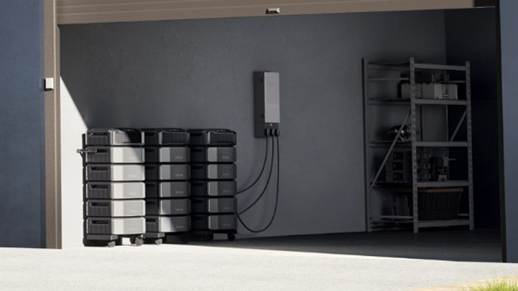
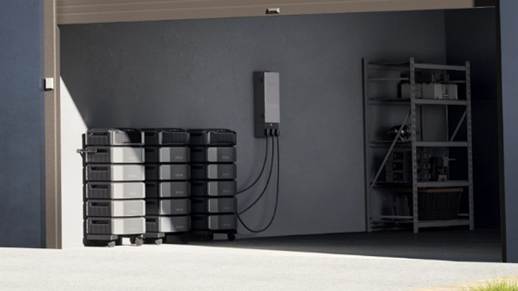
6,144 Wh per battery unit, double the Ultra Plus starting capacity.
Stacks additional units as household demand grows.
Connects through home integration rather than powering devices by cord.
The distinction is worth holding onto. The Delta 3 Ultra Plus covers partial, selected-device backup, while the DELTA Pro Ultra covers whole-home continuity. Our guide to home electric battery backup sets out the difference.
How to Choose Compatible Smart Home Devices
Compatibility can determine whether smart home devices work smoothly together or create extra setup problems, making these nine questions useful before buying:
Question | Why It Matters |
Which Ecosystem Does the Household Already Use? | Reduces compatibility problems |
Does the Device Support Matter? | May improve interoperability |
Does It Require a Hub? | Affects setup requirements |
Does it Require Cloud Access? | Influences outage behavior |
Can Basic Functions Work Locally? | Improves resilience |
Battery-Powered or Mains-Powered? | Determines outage behavior |
What Happens If Wi-Fi Fails? | Reveals the device limitations |
Does the Manufacturer Provide Updates? | Affects longevity and security |
Are Privacy Controls Adequate? | Protects household data |
Privacy and Cybersecurity Checks
Network access makes privacy essential for smart home automation devices, so these seven security checks deserve attention:
Use unique passwords for every device and account.
Enable multi-factor authentication where available.
Keep firmware updated.
Secure the home Wi-Fi network properly.
Review camera and microphone permissions.
Remove unused accounts and retired devices.
Check the manufacturer's software-support policy.
How to Make a Smart Home More Outage-Ready
To keep smart home devices working when the power goes out, sort out these six things ahead of time:
Identify which connected devices genuinely matter.
Know which of them require internet access.
Keep relevant device batteries charged.
Test important automations while everything works.
Calculate your essential electrical loads.
Prepare backup communication options.
During an outage, four actions can help conserve available backup capacity:
Prioritize the router, communication, and important monitoring equipment.
Switch off nonessential loads.
Check which local automations still function.
Preserve remaining backup capacity deliberately.
Keep manual alternatives for anything that matters. Physical keys for smart locks, flashlights rather than smart lighting, and offline emergency contacts. A battery radio too, plus manual controls for essential systems where they exist.
A resilient smart home retains its essential functions when electricity, Wi-Fi, an app or a cloud service becomes unavailable. Our overview of energy-efficient home backup strategies covers the wider household picture.
Conclusion
A useful smart home depends on compatibility, reliable automation, privacy, and practical value. Power and internet can go down separately, so plan for both. Start by backing up the connected equipment you actually need. If you want backup power for more of the house, EcoFlow has portable and whole-home options.
Frequently Asked Questions
1. Can smart home devices work without Wi-Fi?
Some can, depending on how they were designed. Devices using Zigbee, Z-Wave or Thread through a local hub often keep running automations without internet access. Wi-Fi-only devices that depend on a cloud service usually lose most functionality, though many retain manual control.
2. Do Matter smart home devices need a hub?
It depends on the underlying protocol. Matter devices using Thread need a Thread border router, which many smart speakers and displays now include. Matter over Wi-Fi can often connect directly. The standard improves compatibility without removing hub requirements entirely.
3. Do smart devices use a lot of electricity?
Individually very little, though standby draw adds up across a large installation. Hubs, cameras and always-listening speakers consume continuously rather than only when in use. The bigger energy question is usually whether your automations are configured to actually save anything.
4. Will smart locks still work during a power outage?
Battery-powered smart locks generally keep working, since they never relied on household electricity. If the network goes down, the app may not work. You can still use the keypad or physical key on many locks, so keep your key somewhere accessible.
5. Can smart home automations work when the internet goes down?
Locally processed automations often continue, particularly on hub-based systems designed for it. Anything routed through a cloud service typically stops, including many voice commands and remote alerts. Which category your setup falls into depends on the platform.