Entergy Outage Map: Check Power Outages and Prepare Your Home
Outages rarely explain themselves. The lights go out, the air conditioner stops, and the first useful clue may be a neighbor’s porch light across the street. For Entergy customers in Arkansas, Louisiana, Mississippi, and Texas, the Entergy Outage Map is usually the quickest way to find out whether a larger problem has been reported.
The map shows affected areas, approximate customer counts, and restoration estimates when they are available. It won’t always have a complete answer right away. Crews may still be assessing damage, and restoration information can change as field reports arrive. Think of the map as an update on a developing situation, particularly during the first few hours of a major storm.
How Do You Check a Power Outage on the Entergy Outage Map?
You can view the Entergy power outage map on a phone, tablet, or computer. If the router went down with the rest of the house, a smartphone using cellular data will probably be the easiest option.
Open the Entergy Outage Map
Open Entergy’s official outage map or use the company’s mobile app. Save the page to your phone before storm season. It is a small bit of preparation, but it beats trying to search for the right page in a dark house with an unreliable signal.
The main view uses outage markers and red or green line segments. Red indicates that electricity is not flowing through that section of Entergy’s system. Green means the section is energized.
Those colors describe the utility network, not every home connected to it. Your street might appear green even though a damaged service connection, meter base, or piece of customer-owned equipment has left your house without power.
Search by Address or ZIP Code
Start with the full service address when checking your own property. A ZIP code, county, or parish search makes more sense when you want to see how widespread the outage is.
After a hurricane or a large line of thunderstorms, the regional view can become crowded. One numbered circle may represent several separate outages in the same general area. Select the circle or zoom in to see the individual markers.
Address searches aren’t always placed perfectly, especially for apartment buildings, rural properties, and newer subdivisions. If the pin lands nearby rather than directly on the house, compare the surrounding road names with the closest outage markers.
Check Your Outage Status
Select the marker closest to your address. Don’t be surprised if a recent outage has only a small amount of information attached to it. More details may appear after a crew begins its assessment.
Customer impact: The marker may show the approximate number of customers connected with the outage.
Outage details: Entergy may provide a location, current status, or identified cause.
Restoration update: An estimated restoration time may appear once field reports give Entergy enough information to calculate one.
If nothing appears at your address, submit an outage report. Two neighboring homes can be connected to different equipment, so someone else’s report may not cover your service.
What Does the Entergy Outage Map Tell You?
Most people open the map with one question: When will the power come back? The location and size of an outage are often clear before the answer to that question is.
Identify Affected Areas and Customers
Outage markers provide a general picture of customer impact. In places where several incidents overlap, the map may combine them into a numbered circle. Selecting that circle opens a closer view. The Summary tab can also organize outage totals by county, parish, or ZIP code.
Customer counts help show the scale of the problem, although they don’t reveal exactly what failed. A damaged feeder can affect several neighborhoods. A broken service connection might leave only one building dark.
If the entire street comes back except for your home, the original neighborhood problem may be fixed while a second problem remains closer to your meter. That requires a new report and, in some cases, an inspection.
Check Estimated Restoration Times
The Estimated Time of Restoration, or ETR, is Entergy’s best projection based on the information available at that moment. It isn’t a firm appointment.
The first estimate is often the least certain. A crew may arrive expecting to replace a fuse and instead find a damaged pole, a fallen tree, or floodwater blocking access. The posted time can move earlier or later once workers see the full job.
Large storms complicate the picture. One ETR may cover an entire area even though power returns in stages. Some customers may be restored well before the posted time, while homes connected to smaller damaged lines wait longer.
Use the estimate to make decisions about food, medication, work, or temporary lodging. Check it again before relying on an older update.
View Weather and Storm Information
The Layers menu includes weather radar and planned-outage information. During a widespread emergency, Entergy may also place regional updates in a banner or shift the map into a storm-focused view.
Weather can explain why repair activity appears to pause. Lineworkers cannot safely use bucket trucks during every combination of lightning, high wind, and flooding. Even a crew that has reached the area may need to wait until conditions improve.
The radar layer is useful for context. Local emergency alerts should still be used for road closures, shelter information, and evacuation orders.
Recognize Map Status Limitations
There is usually some delay between an event in the field and an update on the screen. During a major storm, that delay can grow as thousands of reports arrive and communications become less reliable.
The map also stops at the utility side of the system. A green line does not prove that electricity has reached every home along it. Damage to a service connection or customer-owned equipment may leave a property without power after the neighborhood line has been energized.
If nearby homes have electricity and yours does not, look for obvious hazards before approaching the electrical panel. Stay away if you see water or damage, hear buzzing, smell something burning, or notice unusual heat. Report the continuing outage if Entergy lists the surrounding area as restored.
| Map Indicator | What It Means | Recommended Home Action |
|---|---|---|
| Outage Icon | Marks a reported outage and reflects the number of customers affected | Select the icon to view available outage details |
| Red Line | The line segment is de-energized, or power is not flowing | Check your address and available outage information |
| Green Line | The line segment is energized, but this does not guarantee power at an individual home | If your home is still out, report the continuing outage |
| Estimated Restoration Time | Entergy's current estimate for when power may be restored | Use it for planning, but continue checking for updates |


What Should You Do If Your Entergy Power Is Out?
Look outside before assuming the problem is only a tripped breaker. If the street is dark or utility equipment is damaged, leave the electrical panel alone and report the outage. Once the outage is confirmed and the area is safe, a portable power station can keep selected essentials running within its rated limits.
Report an Unlisted Outage
Customers can report Entergy outages through its online account tools, the mobile app, by text, and by phone. Customers enrolled in outage texting can send OUT to 36778. The outage line is 800-9OUTAGE (800-968-8243).
Send one report for the address, then monitor the status. Entergy says repeated reports for the same outage do not change restoration priority and may add to call volume. If power returns elsewhere but not at your home, report the continuing outage so the remaining problem is on record.
Track Updates via Entergy Alerts and App
Check the phone number and email address saved in your myEntergy account before severe weather arrives. Outage alerts may include customer counts, crew information, and changes to the estimated restoration time.
Text alerts are also easier on your phone battery than repeatedly reopening the map. During a large emergency, check the Outage Map and Entergy Storm Center for broader restoration updates in addition to account alerts. Look for a banner across the top of the outage map when routine notifications stop.
Checking periodically is enough. Keeping the map open and refreshing it every minute won’t make the repair move faster.
Stay Away from Downed Power Lines
A fallen line doesn’t have to spark, smoke, or move to be energized. Keep people and pets well away from it. Never drive over the wire or touch a vehicle, fence, branch, or puddle that may be in contact with it.
Report downed lines, smoke, or fire to Entergy at 800-9OUTAGE (800-968-8243). Call 911 if there is an immediate danger to people or property.
Provide the best location you can from a safe distance. A close photograph isn’t necessary.
How Should You Prepare Your Home for an Entergy Power Outage?
Weather risks differ across Entergy’s four-state territory. Coastal Louisiana and Texas face hurricanes, while inland areas may lose power after tornadoes, thunderstorms, falling trees, or winter ice.
Once the electricity is off, the household concerns are fairly similar: food warming in the refrigerator, phones running low, medical needs, and indoor temperatures that may quickly become uncomfortable.
Stock Up on Emergency Supplies
Keep the power outage emergency kit where everyone in the home can reach it. A sealed tote works well, though medication and other temperature-sensitive items may need separate storage. At minimum, include:
One gallon of drinking water per person per day for at least three days, plus water for pets
Shelf-stable food the household will eat, along with a manual can opener
Flashlights or headlamps with the correct spare batteries
A battery-powered or hand-crank NOAA Weather Radio
First-aid supplies, prescription medication, and basic hygiene items
Check the kit twice a year. Batteries leak, food expires, and phone cables have a habit of becoming outdated while no one is looking.
Keep Food Properly Refrigerated
Leave the refrigerator and freezer closed. The U.S. Food and Drug Administration (FDA) says that an unopened refrigerator keeps food safely cold for about four hours. A full freezer holds its temperature for roughly 48 hours, while a half-full freezer lasts about 24 hours if the door stays shut.
If the outage is likely to run longer, use coolers and ice for refrigerated food. An appliance thermometer removes some of the guesswork. Food that smells normal is not necessarily safe, so follow current food safety timelines and guidance rather than tasting an item to decide.
Plan for Medical Equipment Needs
Anyone who depends on electrically powered medical equipment needs a plan that does not rely on rapid utility restoration. Discuss battery backup, a safe alternate location, transportation, and medication storage with the patient’s clinician or equipment provider.
Entergy has a medical-needs program, but eligibility is specific. Its current guidance lists households with a ventilator or left ventricular assist device in continuous use, as well as homes with a resident receiving hospice care. Enrollment begins by calling 800-ENTERGY (800-368-3749) and requires information from a physician. Participation does not mean the home will be restored first, so a separate outage plan remains necessary.
A home battery may be one part of that contingency plan, but medical equipment users should confirm compatibility and runtime with their clinicians and equipment providers.
Choose Backup Power for Essential Home Loads
Start with a written list of the equipment that matters during an outage. Refrigeration, a router, phones, lights, a well pump, cooling, and medical equipment do not all draw the same amount of power, and not every household needs to run all of them at once.
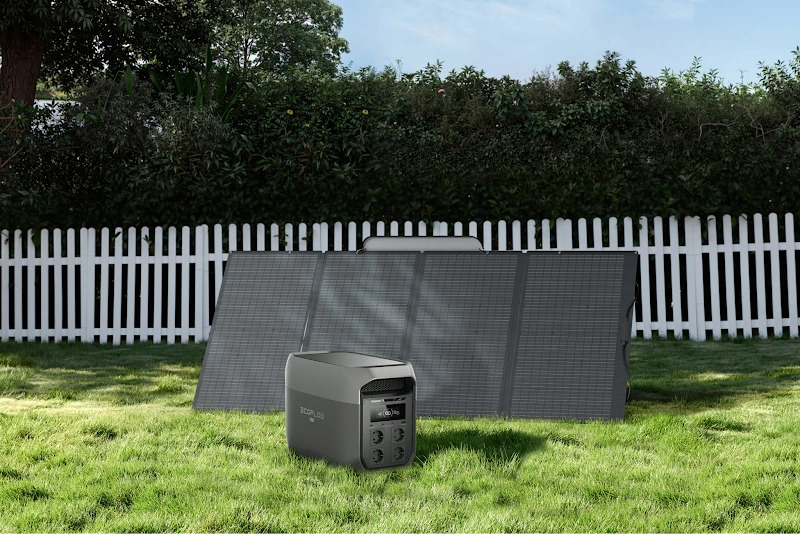
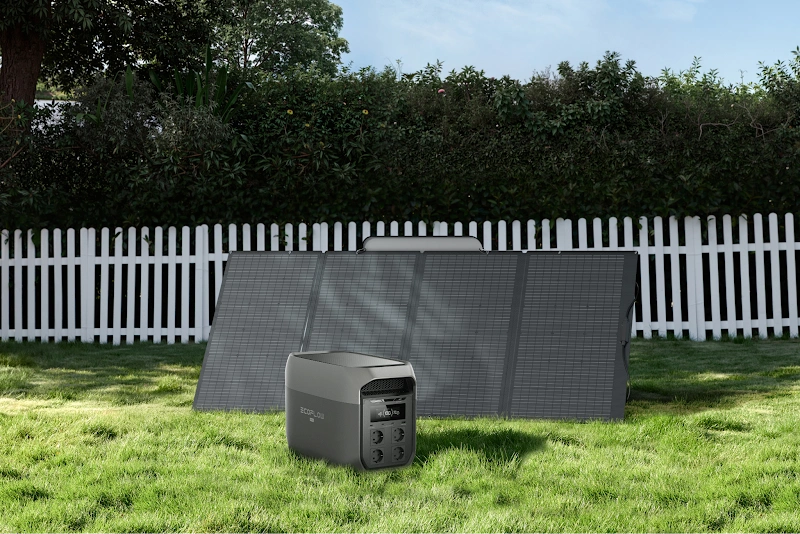
For homes focused on refrigeration, communications, lighting, laptops, and phones, the EcoFlow DELTA 3 Max Portable Power Station provides a portable backup option without the fuel storage, exhaust, or engine maintenance associated with a gas generator. Keep it charged, dry, and ready where the household can reach it.
The EcoFlow DELTA Pro Ultra Whole-Home Backup Power is the broader option for homes that need to account for larger loads, including compatible central air conditioning, a well pump, or selected circuits through the electrical panel. Its expandable design allows the backup system to be planned around longer outages and changing household priorities.
Any equipment connected to home wiring needs the correct transfer equipment and professional installation where required. Decide which loads come first before storm season. A backup system is far more useful after it has been tested with the appliances it is expected to run.
Conclusion
The Entergy Outage Map is a sensible first stop when the electricity fails, but it is only one part of the response. Search the service address, open the nearest outage entry, and expect the restoration estimate to change as crews learn more. File a report if your address is missing. Report it again if the rest of the neighborhood comes back and your home does not.
Preparation handles what the map cannot. Keep your account information current, maintain a modest supply kit, and work out medication or medical-equipment needs ahead of time. If backup power is part of the plan, choose it around the handful of loads your household truly needs.
None of those jobs is complicated. They are simply easier to handle before the weather turns.
FAQ
How Accurate Is the Entergy Outage Map?
The map provides a useful picture of reported outages and their general size, but updates can lag during severe weather. Its markers and line colors reflect conditions on Entergy’s system rather than at every individual property. If your house remains dark despite what the map shows, report the address.
How Can I Check for Planned Power Outages in My Area?
Open the map’s Layers menu and select Planned Outages. Check the email address and phone number attached to your myEntergy account as well, since Entergy may send notice through those channels. Outdated contact information is a common reason customers miss advance messages.
Why Is Entergy Taking so Long to Restore Power?
Electric service has to be repaired in a practical order. Transmission lines and substations supply neighborhood lines, which then supply individual services. Crews may also need to remove trees, replace poles, wait for floodwater to recede, or pause because of lightning and high winds.
After a major storm, detailed damage assessments may continue for several days even while restoration work is already underway.
Why Does Entergy Schedule Planned Power Outages?
Certain repairs and upgrades cannot be completed safely while a circuit remains energized. A planned interruption gives crews a controlled window to replace equipment, perform maintenance, or complete reliability work. These outages may appear on the map, and affected customers may also receive advance notice through their account contact information.
Is It Safe to Use a Portable Generator During a Power Outage?
A fuel-burning generator must run outside, more than 20 feet from doors, windows, and vents. Never operate one inside a home, garage, carport, or enclosed porch, even if the door is open. Keep a working carbon monoxide alarm inside the house.
Battery power stations do not produce combustion exhaust and may be used indoors when permitted by the manufacturer. They should still be kept dry and operated within the manufacturer’s temperature, charging, and load limits.
For press requests or interview opportunities, reach out to our media team
media.na@ecoflow.com