PG&E Power Outage Guide: PSPS Updates, Outage Maps & Emergency Safety Tips
When a severe storm, grid failure, or Public Safety Power Shutoff (PSPS) hits Central or Northern California, you may experience a PG&E Power Outage and need to be prepared. Utility failures require immediate actions for household safety, tracking of the outage, and perhaps most important, reliable backup.
This comprehensive guide outlines the necessary steps to take when the lights go out during a major California power outage. It includes how to use official tracking tools to monitor real-time updates, and how to keep essential appliances running during extended outages.
What Should You Do When a PG&E Blackout Hits?
The first 15 minutes of a power outage are critical for keeping your home and contents safe. You’ll need to transition quickly from the initial confusion to an organized response.
Check Your Neighbors
First, look outside to see if your neighbors are dark as well. If your home is the only one affected, checking your main breaker panel for a tripped circuit should be your first step before contacting the utility.
Report to PG&E
You can report the issue via your online account or calling the utility’s emergency number. This provides critical data that helps crews locate faults and restore service faster.
Unplug Sensitive Electronics
When the power is restored, there’s often a very high power surge to the entire system. To protect your devices from severe damage from post-blackout voltage spikes, physically unplug them. This includes any computers, high-end TVs, microwave ovens, and gaming consoles. Leaving them plugged in can permanently damage sensitive circuit boards, as the grid often sends a momentary high-voltage spike upon restoration. Standard surge protectors often fail to suppress these large spikes.
Gather Emergency Supplies
Gather flashlights, a battery-powered radio, and bottled water, and place them in a central location such as the kitchen counter before it gets dark. A portable power station can also be kept nearby to provide backup power for phones, radios, and other essential devices during an outage. These essential supplies should be easy to reach and will help you stay organized in the dark.
How to Use the PG&E Outage Map to Track Power Outages?
The official PG&E power outage map is your primary source to know real-time status of the grid. If you are facing a sudden PG&E outage today, being familiar with the website is worthwhile doing ahead of time. Try using both your computer and on your phone to access PG&E. This will reduce confusion when the power goes out, and you can quickly find your current PG&E outage status and get updates.
Enter Your Service Address
Use the search bar in the top corner on the live map to enter your specific street address. This centers the map on your service address.
Find Outage Boundaries
Zoom out slightly so you can see the color-coded polygon shapes on the utility map. This boundary helps indicate whether the blackout is a highly localized street issue or a massive, county-wide grid emergency.
Check Restoration Estimates
Click directly on the outage icon (rather than just the shaded area) to view the Estimated Time of Restoration (ETTR) and field crew status. Note that these automated predictions are estimates and often shift during severe weather conditions.
Understand Outage Causes
On the utility’s website you can find out whether the system identifies the cause as “Scheduled Maintenance,” “Weather-Related,” or “Under Investigation” (which means crews are still actively locating the physical damage). Knowing this designation helps you assess the likely restoration timeline. If it says “Under Investigation” during a severe windstorm, this typically implies a much longer wait time. You will find the latest outage information, restoration estimates, and outage reporting tools on the official website PG&E Outage Center.


How Can You Keep Your Home Running During Long Blackouts?
When a blackout stretches past just a few hours, you need a way to keep your important appliances running and household functional.
Keep Phones and Radios Charged
Your phone is an important communication tool for emergency alerts and map checking during an outage. You should keep portable power banks fully charged and available. You can easily charge any device using a desktop battery station. This is much better than having to idle your car just to recharge electronics.
Light Essential Living Spaces
Avoid relying on candles whenever possible. Instead, use battery-operated LED, camping style lanterns. Locate them in central areas like on kitchen islands to provide enough area lighting for safe movement.
Keep Your Fridge and Freezer Running Overnight
Refrigerators are often the highest-priority appliance during a prolonged outage because food can spoil quickly once temperatures rise. When a blackout occurs, most homeowners assume power will return within a couple hours. But when the outage extends beyond a couple of hours, and no clear estimate for power, homeowners are often left wondering how long food can remain safe. You may have a refrigerator and freezer full of food that can go bad, potentially resulting in hundreds of dollars in wasted food.
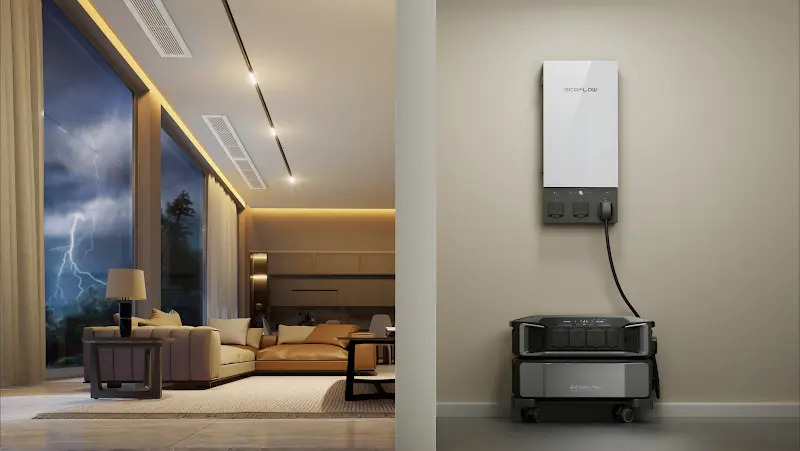
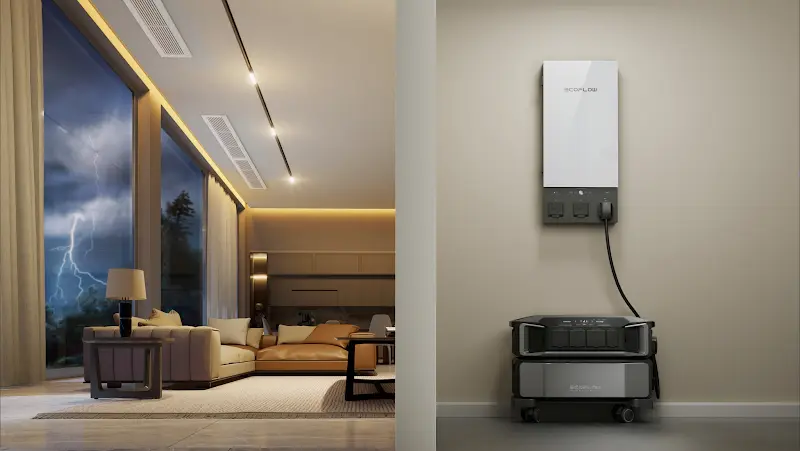
To protect themselves against this loss, many households include a reliable backup power system in their emergency plans. Because restoration timelines are often uncertain during major outages, a solution like the EcoFlow DELTA Pro Ultra Whole-Home Backup Power can help power refrigerators and other essential household appliances. It also helps avoid the noise, fumes, and fuel-related challenges associated with traditional gas generators.
Charge Laptops with Portable Solar Setups
If the power outage gets extended, it can make your life much more complicated. It’s not just about losing your fridge and lights—staying connected and working from home becomes nearly impossible. If you lose power to your router, and run out of charge on your laptop and tablet, remote work will slow to a halt. However, backup power solutions can help reduce this disruption.
You can maintain your internet and cell phone connectivity during unpredicted utility outages if you have a self-sustaining energy alternative. The EcoFlow DELTA 3 Max Plus + 4 x 125W Solar Panel offers you an easy way to keep essential electronics fully operational. To use, simply angle the lightweight solar panels outdoors towards the sun. The panels give you an independent power source that helps maintain internet access and device charging during prolonged outages.
How Do You Stay Safe During a Multi-Day Blackout?
Power outages can turn into a multi-day event, and you need to take special steps to keep safe and avoid hazards.
Store Food and Water Safely: Keep non-perishable goods, high-protein snacks, and at least one gallon of potable water per person per day on hand to eliminate the need for cooking.
Avoid Indoor Generator Hazards: Never run a gasoline generator inside your home, garage, or near open windows. Exhaust fumes contain lethal carbon monoxide gas so keep generators at least 20 feet away from any home opening.
Protect Refrigerated Medications: Some medications are temperature-sensitive like insulin. Keep these in a small cooler with an ice-pack or use a portable mini-battery station to maintain required storage temperatures. Be sure to know your manufacturer’s storage requirements for temperature-sensitive medications. Safe temperature ranges vary by product.
Dispose of Spoiled Food: Follow official food safety recommendations during outages to help decide whether to discard perishable foods or not. As a general rule, toss out perishable food or dairy if your refrigerator has been without power for more than four hours. A closed freezer, by comparison, can keep frozen foods safe for up to 48 hours. This assumes doors are kept closed as much as possible. You can also use ice packs to help preserve food during longer outages.
How Can You Prepare for the Next PG&E Outage?
The best time to prepare for an extended grid failure is when all the local power lines are working perfectly.
Prepare for PSPS Shutoffs
Public Safety Power Shutoffs (PSPS) are preventive outages initiated by PG&E. These are designed to reduce wildfire risk during periods of extreme weather, such as high winds and low humidity. In recent years, PG&E has repeatedly implemented PSPS events across Northern California during periods of elevated wildfire risk, affecting thousands of customers in some cases. Restoring power may take longer than expected because crews must inspect lines and equipment before service can safely resume.
To be prepared for any PSPS events, be sure to sign up for PG&E’s text and email alerts. Learning how to prepare for a planned power outage helps homeowners secure food, water, and emergency supplies in advance. This way you receive advance notice before the utility intentionally cuts power to your area. Use the time after the advance notice to fully charge backup power sources and prepare your home for a potential multi-day outage.
Plan for Wildfire Season Outages
Wildfires can shut down transmission lines miles away that cause immediate blackouts even if you’re far from the fire and smoke. Keep your car’s gas tank at least half full during this season and map out regional evacuation routes. Cross-referencing your household supplies with a dedicated power outage emergency supply kit checklist ensures your family remains safe during these unpredictable seasonal shutoffs. Also, make sure your home emergency kit is packed and ready to use.
Know Your Essential Appliances
To prepare for using a backup power system, separate your household appliances into strict “wants” and “needs.” A prolonged grid failure requires prioritizing the essential devices that support health, food preservation, communication, and basic household safety. The table below will help you identify which appliances should receive priority when planning your backup power strategy.
| Appliance Type | Typical Running Power | Emergency Priority |
|---|---|---|
| Critical Medical Devices (CPAP/Oxygen) | 30W – 300W | Critical (Life Safety) |
| Refrigerator / Freezer | 100W – 800W | High (Food Preservation) |
| Wi-Fi Router & Modems | 5W – 20W | High (Communications) |
| Smartphones & Laptops | 15W – 100W | Medium (WFH & Info) |
| LED Emergency Lighting | 5W – 20W | Medium (Basic Navigation) |
Calculate Your Power Needs
Once you have identified your priority appliances, you can calculate your total energy requirements. Devices such as Wi-Fi routers, smartphones, and laptops draw relatively steady power for longer times. Appliances that have a compressor or motor, such as refrigerators and freezers, run intermittently over long periods. Consequently, when the motor cycles on, they have a significantly higher startup surge that can be several times their normal running wattage. So, make sure your backup battery or solar generator can support both continuous power demands and peak starting loads. Otherwise the system may become overloaded.
Test Your Emergency Equipment
Regularly test your backup battery system to ensure it functions properly during an emergency. Clean your solar panels and run a quick diagnostic ahead of any potential power outage. Additionally, set a calendar reminder every three months to inspect your gear and recharge the batteries.
Conclusion
The most effective strategy to deal with power outages combines these elements: preparation, real-time outage tracking, food and medication safety, and a reliable backup power plan. Whether the outage lasts a few hours or several days, preparation in advance will protect your household and reduce disruption. While outages cannot always be prevented, a well-prepared plan helps minimize disruption.
FAQ
Can You Use a Corded Phone When the Power Goes Out?
It depends. Traditional copper landlines may still work during short outages because they draw power from the phone company’s central office, but modern fiber-optic and VoIP systems require immediate local backup power.
How Long Do Eggs Last in a Power Outage?
Eggs may remain safe for several hours if the refrigerator stays below 40°F. Follow FDA food safety guidance when evaluating refrigerated foods after an outage.
What Foods Cannot Be Refrozen?
Thawed raw meats, poultry, seafood, and dairy products must never be refrozen once they warm past 40°F. Only hard cheeses, breads, and fruits can safely go back into the freezer.
How Can I Cool My House if I Have No Power?
Block direct sunlight by closing all blinds immediately, then open opposite windows at night for a cross-breeze. You can also use small, battery-powered portable fans.
What Is the First Thing You Do When the Power Goes Out?
Look out the window to see if your neighbors’ lights are out. This instantly tells you if it is a widespread grid failure or just a tripped circuit breaker in your own home.
For press requests or interview opportunities, reach out to our media team
media.na@ecoflow.com