From Essential Appliances to Home-Circuit Backup: Choose the Right DPUX Connection Path
- What Are the Three DPUX Home Backup Paths?
- Which Loads Should You Back Up First?
- How Do You Size the System From Your Load Data?
- When Is Direct Appliance Backup the Right Choice?
- When Should You Use a Manual Selected-Circuit Backup?
- When Is Fixed Automatic Home Backup the Right Choice?
- How Do You Confirm DPUX Compatibility?
- What Should a Qualified Installer Check?
- What Should You Record After Installation?
- FAQ:
- Conclusion
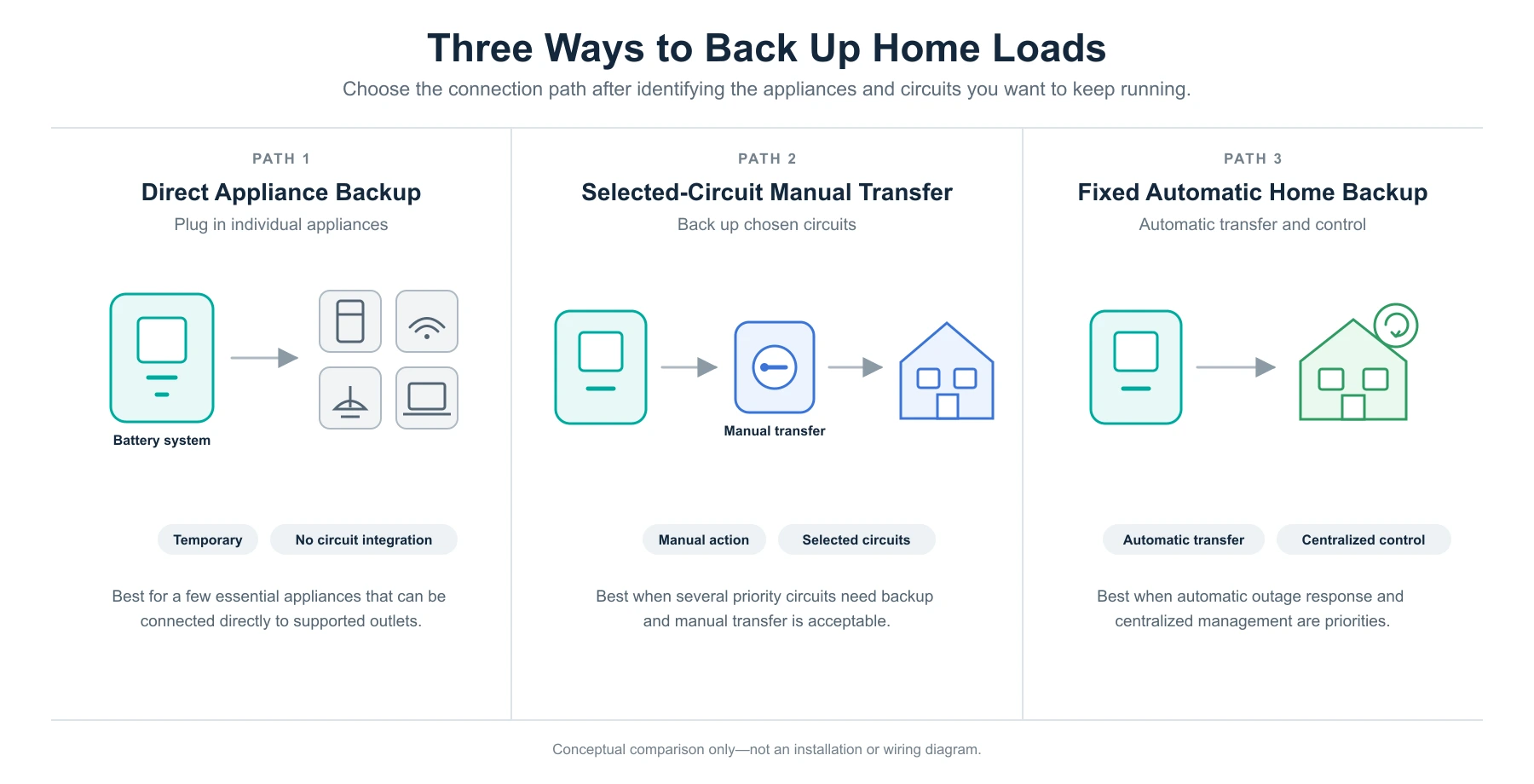
The right home-backup connection path depends on which loads must stay on and whether they plug in directly or run through household circuits. Use direct appliance backup for a few cord-connected essentials, manual transfer for selected circuits, or fixed automatic backup when automatic circuit control is a priority.
For one household, that may be a refrigerator, router, and a few lamps. For another, it may include a well pump, heating equipment, or several kitchen circuits. The EcoFlow DELTA Pro Ultra X (DPUX) supports these applications, but the correct setup depends on the loads, required runtime, existing electrical equipment, site conditions, and local requirements.
Start with the loads. Then choose the connection method that fits them.
What Are the Three DPUX Home Backup Paths?
Direct appliance backup: Power essential cord-connected appliances directly from DPUX without connecting to the home's electrical panel.
Selected-circuit backup with manual transfer: Back up selected household circuits through an approved manual-transfer setup.
Fixed automatic home backup: Connect DPUX to a supported SHP3 or Smart Gateway configuration for the automatic backup of configured home circuits.
“Whole-home backup” does not mean that every appliance can run simultaneously or indefinitely. Coverage and runtime depend on the selected loads, starting demand, battery capacity, charging conditions, and system configuration.
Which Loads Should You Back Up First?
Think about what would make an outage difficult or unsafe if it stopped working. A typical priority list might include:
Refrigerator or freezer
Modem, Wi-Fi router, and phone chargers
Essential lighting
Sump or well pump
Heating or cooling equipment
Other appliances that protect health, safety, or the home
Medical equipment may require a dedicated backup plan and additional requirements. Follow the applicable guidance for that equipment rather than treating it like an ordinary household load.
For each priority load, record:
Running power: The power required during normal operation
Starting or surge power: The brief additional demand when motors or compressors start
Daily energy use: The energy the load uses over a representative day
Target backup time: How many hours or days the load needs to operate during an outage
Priority: Whether the load must stay on, can be scheduled, or can remain off
This information helps you choose between direct appliance backup, selected-circuit backup, and fixed automatic home backup. Before planning a connection to the home's electrical system, also gather information about the electrical panel, subpanels, existing solar or backup equipment, and previous EcoFlow equipment.
How Do You Size the System From Your Load Data?
Use measured daily energy when possible. For steady loads, multiply average running watts by operating hours. For cycling loads such as refrigerators, pumps, and air conditioners, use measured energy or actual operating-time data instead of multiplying nameplate watts by 24.
Required load energy = daily load energy × backup days
Keep in mind that the energy your loads need is not the same as the battery’s nominal capacity. Reserve settings and conversion losses reduce the energy available to your appliances.
For example, if your loads use 3 kWh per day and need two days of backup, they require 6 kWh of delivered energy. With a 10% reserve and 90% discharge-to-load efficiency, the nominal capacity estimate:
6 kWh ÷ (0.9 × 0.9) ≈ 7.4 kWh
(This is a planning example, not a DPUX performance claim or a recommendation for a specific battery configuration.)
Use the official DPUX Specs page to verify output, capacity, and expansion limits. This calculation is for planning only; check your selected DPUX configuration against your actual load requirements.
When Is Direct Appliance Backup the Right Choice?
Choose this path when you only need to keep a small number of cord-connected essentials running, such as a refrigerator, router, lights, device chargers, or selected home-office equipment.
What you need: A DPUX and compatible battery configuration sized for the appliances, plus the supported output receptacles, charging cables, and approved accessories.
Best for: Renters, short outages, or homeowners who only need a limited number of cord-connected loads.
Limit: Only appliances connected directly to DPUX receive backup power. This path does not automatically power hardwired lighting, HVAC, pumps, or wall outlets elsewhere in the home. Never connect the system to household wiring through an improvised cord or ordinary receptacle.
When Should You Use a Manual Selected-Circuit Backup?
Choose this path when you want selected household circuits, such as kitchen outlets, lighting, a well pump, or heating equipment, to operate through their normal switches and receptacles during an outage.
You'll need an inlet, transfer equipment, protection, and cables rated for your DPUX setup. Don't buy any connection hardware until a qualified installer has confirmed the full supported arrangement and checked local requirements. A matching connector on its own doesn't mean the system is compatible.
This approach works well for partial-home backup where you want selected circuits to stay on their existing wiring and you're fine managing the transfer yourself.
The catch: your transfer equipment and connection method have to match the approved electrical design. Only the circuits included in that design get backup power. You'll need to manage simultaneous loads yourself and follow the commissioned transfer procedure. Connections to building wiring must be assessed and installed by a qualified professional, with permits and inspection as required.
When Is Fixed Automatic Home Backup the Right Choice?
Choose this path when automatic outage response and centralized circuit control are priorities.
Within this category, two options differ mainly in how much individual circuit control you get and how they're installed:
SHP3: Supports 32 independently controlled circuits and can be part of a panel replacement or upgrade. It's the better pick when you want to control more home circuits individually. See the SHP3 product page and FAQ for details.
Smart Gateway: Supports 6 remotely controlled circuits and is designed to be installed upstream of an existing electrical panel. Consider Smart Gateway when an upstream automatic-transfer design around the existing panel suits the site and its controllable circuits meet your needs. See the Smart Gateway product page.
Either way, you need a properly sized DPUX inverter and battery configuration, a compatible SHP3 or Smart Gateway design, and the cables, protection devices, breakers, monitoring components, and other approved accessories the setup calls for.
One thing to keep in mind: automatic transfer doesn't remove output or runtime limits. High-demand loads may still need load management. Final equipment selection, permits, installation, testing, and inspection must follow the approved design and local requirements. See the EcoFlow installation terms.

How Do You Confirm DPUX Compatibility?
Before reusing existing EcoFlow equipment with DPUX, check the exact product and connection path in the current DPUX Support documentation.
SHP3 or Smart Gateway: These are the current fixed-home integration options listed for DPUX. Use the required connection cables and approved accessories for the selected system.
Smart Inlet Box: In supported configurations, the Smart Inlet Box (Smart Home Panel 2 Upgrade) provides the connection between compatible EcoFlow equipment and SHP3 or Smart Gateway. It is not a universal manual-transfer device. See the SHP3 product page and FAQ for the supported connection paths.
Existing SHP2: Do not assume that SHP2 can connect directly to DPUX. A supported upgrade path may require the Smart Inlet Box and specified cables and equipment.
Existing DELTA Pro Ultra batteries: Some first-generation batteries can be used with DPUX under specific conditions. For batteries with serial numbers starting with Y712, EcoFlow specifies an upgrade procedure and connection requirements. Check the exact battery and current Support instructions before connecting it.
A matching connector or the EcoFlow brand name does not by itself confirm compatibility. If a product, cable, or configuration is not specifically listed for your setup, do not assume it will work. Check the current approved documentation before purchase or installation.
What Should a Qualified Installer Check?
Direct appliance use normally does not involve the home electrical panel. Any connection to building wiring, including an inlet, transfer device, panel, gateway, hardwired circuit, or fixed automatic system, must be evaluated and installed by a qualified professional as required by the product instructions and local law.
Before the site assessment, gather this information for the installer:
Your priority load and circuit list — include running power, starting power, daily energy, and target backup time for each
Photos and model info for the meter, main panel, subpanels, rooftop solar, inverter, generator, and any existing transfer equipment
The installation address, where you'd like the equipment located, and any previous electrical modifications or permits
The installer should then figure out:
Whether your existing electrical system and proposed location can support the setup
The correct connection path, full equipment list, protection requirements, and circuit configuration
Whether you'll need panel work, structural work, permits, utility coordination, or inspection
How to handle final installation, testing, commissioning, labeling, and handover records
The installation agreement should state who obtains permits and inspections, which materials and labor are included, and which site work may involve additional charges. Do not bypass required transfer equipment, electrical isolation, permits, inspections, or professional installation.
Review the current Installation Terms and Conditions for service coverage, exclusions, fees, and customer responsibilities.
What Should You Record After Installation?
Before the project is closed, the homeowner should receive and retain a record containing:
The bill of materials, equipment models, quantities, cables, adapters, breakers, and protection devices
Every backed-up circuit, breaker rating, major connected load, priority, and load-management rule
The connection path and approved system diagram or as-built drawing, where applicable
Continuous output, starting-load assumptions, usable energy configuration, and target operating plan
Equipment serial numbers, firmware and app versions, permits, inspection records, commissioning date, installer contact information, warranty terms, and maintenance instructions
This record makes future troubleshooting, expansion, warranty claims, and compatibility reviews much easier.
FAQ:
Which appliances should I back up first?
For many households, start with the refrigerator or freezer, modem and Wi-Fi router, phone chargers, and essential lights. Add a sump pump, well pump, or essential heating and cooling when losing those functions could put the home at risk. Hold off on laundry, entertainment, and EV charging until you've confirmed that your power and energy budget can handle them.
What is the difference between continuous and starting power?
Continuous power is what a device draws while running normally. Starting or surge power is a brief higher demand when certain motors and compressors start. A capacity depends on daily energy use and required backup time. As a planning example, loads using 3 kWh per day need 6 kWh of delivered energy for two days without recharging. Reserve settings and conversion losses mean that a 6 kWh nominal battery may not deliver 6 kWh to the loads. Use your own load data and verify power limits and supported battery configurations before buying. The stem must support both the expected simultaneous running load and realistic startup events.
How much battery capacity do I need?
Capacity depends on your daily energy use and how long you need backup. As a planning example, loads using 3 kWh per day need 6 kWh of delivered energy for two days without recharging. That does not mean a 6 kWh battery is enough: reserve settings and conversion losses reduce the energy available to your loads. With an assumed 10% reserve and 90% discharge-to-load efficiency, the nominal storage estimate is about 7.4 kWh.
This is a planning example, not a DPUX performance claim or a recommendation for a specific battery configuration. Use your own load data and verify power limits and supported battery configurations before buying.
Which DPUX Backup Path Should I Choose?
Choose direct appliance backup for a limited number of cord-connected loads, manual selected-circuit backup for selected household circuits when you can manage the transfer, and fixed automatic home backup when automatic transfer and centralized circuit control are priorities. Size the system from your loads and target runtime first, then confirm the equipment and installation requirements for the selected path.
How do I choose between SHP3 and Smart Gateway?
Choose SHP3 for more individual circuit control, or consider Smart Gateway if you want to keep your existing panel and its six remotely controlled circuits meet your needs.
Conclusion
Choosing the right DPUX home backup path starts with the loads, not the panel. Direct appliance backup works for a few cord-connected essentials, manual selected-circuit backup extends coverage to chosen household circuits, and fixed automatic backup adds automatic transfer and centralized circuit control.
After choosing a path, size the system for running power, starting demand, daily energy use, and required runtime. Then verify current DPUX compatibility, equipment requirements, and local installation rules. Any connection to home wiring should be confirmed and installed by a qualified professional so the final system matches your household's backup priorities and electrical setup.
For press requests or interview opportunities, reach out to our media team
media.na@ecoflow.com