Portable Monitor Setups: Maximizing Productivity on the Road
- Why Portable Monitors Have Become Central to the Modern Remote Workspace
- Key Features Driving On-the-Go Performance: Display, Power, and Portability
- Design for Portability: Foldable, Built-In Batteries, and Light Weight
- Choosing the Right Portable Monitor for Your Needs
- On-the-Go Power Solutions for Portable Monitor Setups
- Frequently Asked Questions
- Power Your Portable Monitor With EcoFlow Portable Power Stations
Remote work is here to stay. Once industries and professionals realized that they could be just as productive at a coffee shop, in an RV, or posted up at a beachside cafe as they were in their cubicle, a whole new world opened up.
The most challenging aspect is often managing a remote office. Laptops can feel way too small when you need to get work done, and they can strain your eyes. But an entire desktop setup isn’t feasible. Thankfully, portable monitors are the perfect solution to save the day.
Why Portable Monitors Have Become Central to the Modern Remote Workspace
Working on a single laptop screen can get old quickly. You're constantly switching between tabs, squinting at tiny text, and fighting headaches from the eye strain. Remote workers have realized that cramming everything onto a 13-inch display simply doesn't suffice anymore.
Portable monitors solve this problem by providing you with the second screen you've been craving. You can combine them with your laptop screen to spread out massive spreadsheets and create a much broader work ecosystem than you had before. Even if you’re camping, you can make it work. All you need is a picnic table.
When you're working remotely and every minute counts, any kind of efficiency gain can make the difference between crushing your deadlines and scrambling to catch up.
Key Features Driving On-the-Go Performance: Display, Power, and Portability
Display technology has improved dramatically – today's portable monitors often look better than the desktop monitor gathering dust in your old office. Most use sharp 1080p panels, but you can also upgrade to 4K options if you prefer something a level up.
Power efficiency has also improved dramatically. These monitors sip power instead of guzzling it, typically using just 15-25 watts during everyday use. That's huge when you're doing off-grid remote work and can't just plug into the nearest outlet whenever your battery dies.
Connection options have gotten much smarter as well. USB-C handles both power and video through a single cable, while wireless options eliminate the need for cables. Setup takes seconds instead of minutes, which matters when you want to work from that perfect spot by the lake but only have a short window before the sun moves.
Design for Portability: Foldable, Built-In Batteries, and Light Weight
Portable monitor designs have come a long way from the chunky, awkward displays that once masqueraded as "portable." Today's models fold down to tablet size, making them easy to slip into backpacks or laptop bags. Some even fold completely in half, which is perfect for professionals who need to fit in their RV or other tight spaces.
Built-in batteries changed everything. Instead of hunting for power outlets or draining your laptop battery even faster, many monitors run for 4-8 hours on their own juice. You can set up shop anywhere and actually get work done instead of constantly worrying about power.
Weight matters more than you'd think. The best portable monitors weigh between 1.5 and 2.5 pounds. That’s light enough that you won't regret bringing them, but substantial enough that they don't feel flimsy.
Choosing the Right Portable Monitor for Your Needs
Your portable monitor is an investment in your daily lifestyle and your career. Choose wisely.
Size, Brightness, and Resolution Considerations
Size boils down to a simple tradeoff: bigger screens help productivity but hurt portability. A slim and trim 13-15 in model is easy to throw in a suitcase or backpack without adding much weight. If you prefer something bigger, just know it will take up more bag space.
As for brightness, 300 nits barely cuts it in bright coffee shops, and outdoor work demands a minimum of 400-500 nits. Consider where you plan to work to make sure you get it right.
The display quality we discussed earlier is primarily determined by resolution. 1080p works fine for most work tasks, but if you have a powerhouse laptop that can handle 4K, it will make everything look brighter, crisper, and clearer.
Panel Types, Color Accuracy, and Viewing Angles
IPS panels are popular for a reason; they deliver consistent colors and work well from any sitting angle. If you’re working in a creative field, look for a display that covers 90-100% of the sRGB color space. This might sound technical or tedious, but you’ll appreciate the payoff.
Viewing angles matter more in mobile setups where you can't always position everything perfectly. Good IPS panels maintain their quality across wide viewing angles, so your display looks great whether you're hunched over a tiny café table or stretched out on a park bench.
Connectivity and Power Options
USB-C connections offer the cleanest experience. One cable handles power and video when your laptop supports it. HDMI works with more devices, but it requires a separate power source. Some monitors include both options.
Use a power bank when on the go, and for a great, sustainable option when WFH, connect to a whole-home generator.
On-the-Go Power Solutions for Portable Monitor Setups
You don’t want to put your work time at risk, so a reliable power solution is absolutely paramount.
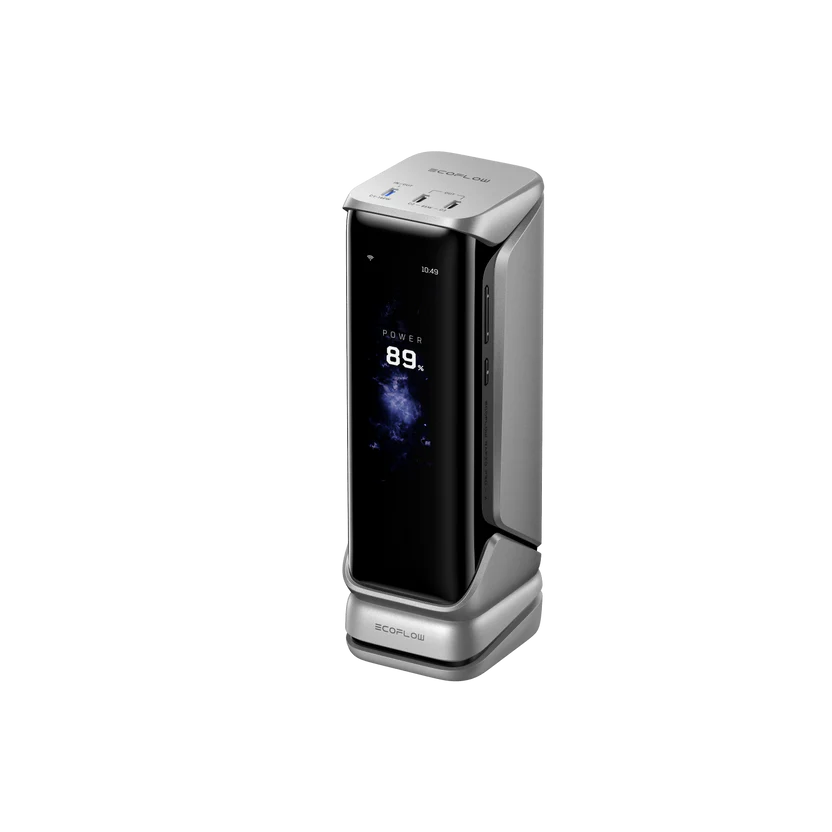
The EcoFlow RAPID Pro X Power Bank (27,650mAh, 300W) handles this challenge head-on with enough power to run laptops, monitors, and accessories simultaneously without breaking a sweat. The 300W output means you won't have to choose between powering your laptop or your monitor. You can run everything at full performance.
Frequently Asked Questions
Does an External Monitor Improve Productivity?
Yes, more monitors consistently deliver productivity improvements. The exact boost depends on your work, but most people notice significant improvements in multitasking efficiency and overall workflow once they add that second screen.
Are Portable Monitors Good for Travel?
Yes, as long as you pick the right one. Choose a portable monitor that folds up small and weighs less than a hardcover book. Just avoid budget models that feel too flimsy to withstand planes, trains, RVs, and cars.
How Many Monitors Are Optimal for Productivity?
Stick with two: your laptop plus one portable. Any more than that and it becomes chaos. Your computer struggles, cable management becomes a nightmare, and you spend more time managing screens than actually working. Two gives you plenty of space without the headaches.
Power Your Portable Monitor With EcoFlow Portable Power Stations
Portable monitors have allowed remote work to feel just as productive as office work. Work-from-anywhere warriors are no longer limited to tiny laptop screens; you can pair a quality portable display with a reliable power solution like an EcoFlow Power Bank and maintain serious productivity from virtually anywhere. The trick is finding components that balance performance, portability, and power efficiency to match how you actually work and travel.
For press requests or interview opportunities, reach out to our media team
media.na@ecoflow.com