How to go live on TikTok: All You Need to Know as a Beginner
Starting something new on a fast-moving platform, like how to go live on TikTok, can often feel uncertain, especially when features and tools are constantly evolving. For many users, the challenge isn't just using a feature, it's understanding how it fits into the overall content experience. Live streaming has emerged as a natural extension of social interaction, offering a more direct and immediate way to connect. In some cases, having reliable backup power solutions such as solar batteries can also help ensure uninterrupted streaming during longer sessions or unstable conditions. This guide breaks things down in a simple way, helping you navigate the process without confusion or guesswork.
What is TikTok Live?
TikTok Live is a real-time broadcasting feature that allows creators to connect with their audience instantly through interactive video sessions. Rather than pre-recorded clips, it enables spontaneous communication where viewers can comment, react, and send virtual gifts during the stream. This format encourages dynamic engagement, making conversations feel more direct and unfiltered. It is commonly used for Q&A sessions, performances, tutorials, or community interaction, offering a more immersive way to build audience relationships.
Requirements to go live on TikTok
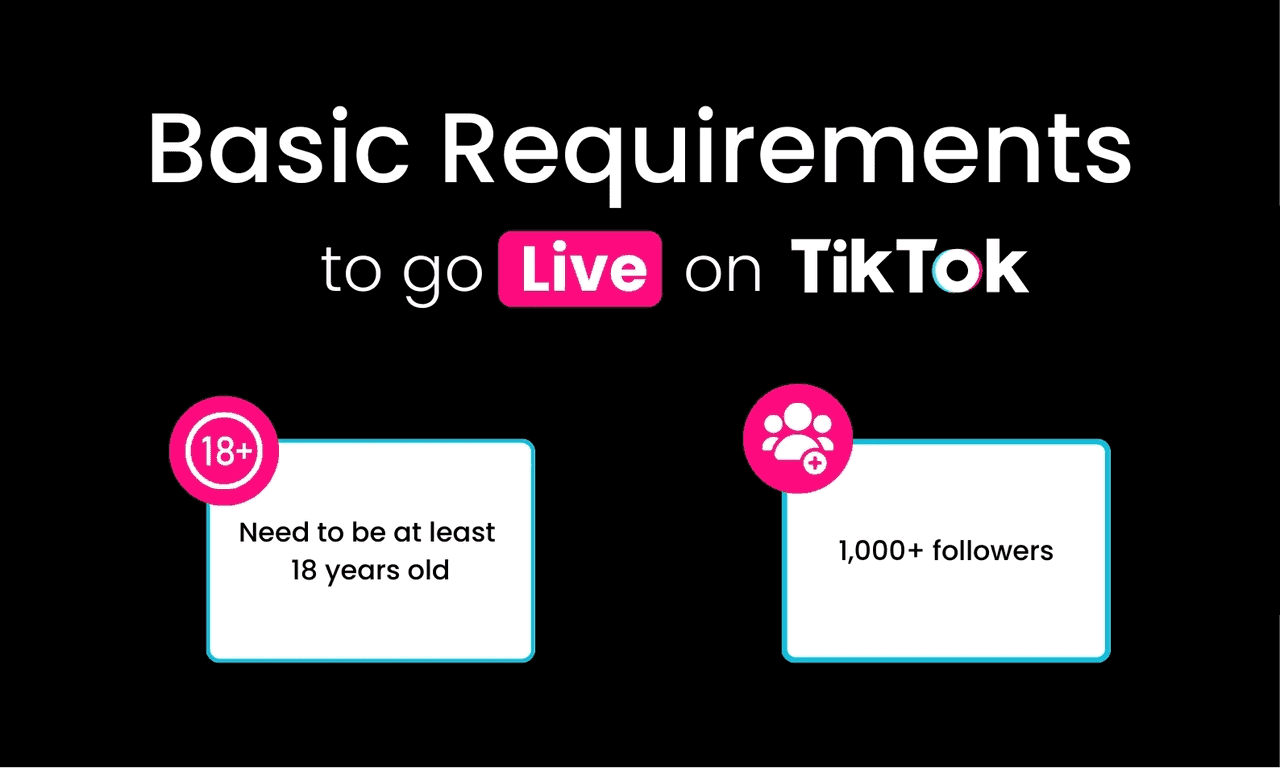
Gaining TikTok live access isn't automatic; the platform sets a few essential conditions to maintain quality and safety during broadcasts. Before starting a live session, users must meet specific criteria related to audience size, age, and overall account standing.
Minimum follower count
To unlock live streaming, a creator must typically reach at least 1,000 followers. This threshold ensures that those going live already have a basic level of audience engagement. It also helps maintain meaningful interactions, as live sessions are designed for active viewer participation rather than isolated broadcasting.
Age requirement
TikTok requires users to be at least 16 years old to access live features. However, additional privileges, such as receiving virtual gifts, are restricted to those aged 18 and above. These limitations are in place to align with digital safety standards and responsible content creation practices.
Account eligibility
Beyond numbers and age, the account must comply with TikTok's community guidelines and policies. Any violations, such as inappropriate content or repeated warnings, can restrict access to live features. A clean account history ensures a safer environment for both creators and viewers during real-time interactions.
How to go live on TikTok step-by-step
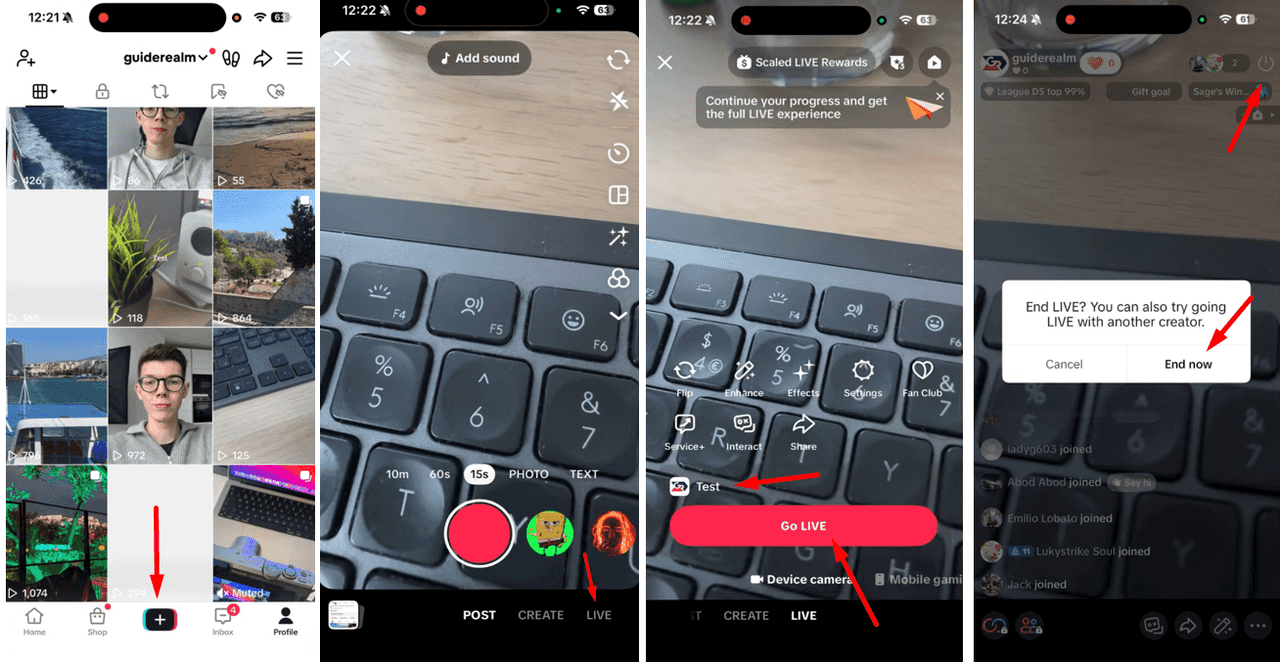
Here is a step-by-step guide on how to get live access on TikTok:
Step 1: Open the TikTok app
Begin by launching TikTok on your device and ensuring you're logged into the correct account. A stable internet connection is essential at this stage, as live streaming depends heavily on real-time data transfer.
Step 2: Tap the "+" button
Once inside the app, locate the "+" icon positioned at the bottom center of the screen. This button typically opens the content creation interface, where users record or upload videos. From here, you'll access additional options that extend beyond standard posting features.
Step 3: Select the "LIVE" option
Within the creation panel, swipe through the available modes until you find the "LIVE" tab. This section activates the broadcasting setup, distinguishing it from regular video uploads. If you're wondering how to go live on TikTok, this is the point where the platform transitions from recording to real-time streaming functionality.
Step 4: Add a title for your stream
Before starting, you'll be prompted to enter a title that briefly describes your session. This heading acts as the first impression for potential viewers, so it should be clear and engaging. A well-crafted title can significantly influence whether users choose to join your live stream.
Step 5: Tap "Go Live"
After finalizing your setup, press the "Go Live" button to begin broadcasting. At this moment, your stream becomes visible to followers and potentially a wider audience. You can interact with viewers through comments, respond in real time, and adjust your delivery as the session unfolds.
Step 6: End your live stream
When you're ready to conclude, simply tap the power icon on the top right to stop the broadcast. TikTok will then provide a summary of your session, including viewer count and engagement metrics. Reviewing this data can help refine future streams and improve overall performance.
How to go live on TikTok without 1,000 followers
Although TikTok typically requires a minimum follower threshold for live access, there are strategic ways to work around this limitation. Building a consistent posting routine with engaging, niche-focused content can accelerate audience growth and help you reach eligibility faster. Collaborating with other creators, participating in trends, and optimizing hashtags also increase visibility and interaction. In some cases, users may gain early access through special events or platform testing features, though this is not guaranteed. Ultimately, focusing on authentic engagement and steady content creation remains the most reliable path to unlocking live streaming.
Best settings for TikTok Live
Understanding how to go live on TikTok is only part of the process; optimizing your setup plays a crucial role in delivering a professional stream. The right adjustments can significantly influence clarity, engagement, and overall viewer retention.
Lighting setup
Proper illumination ensures your face and surroundings remain clearly visible throughout the session. Natural light works well, but ring lights or softbox setups provide more consistent brightness. Position the light source in front of you rather than behind to avoid unwanted shadows or silhouettes.
Camera positioning
The placement of your camera directly affects how viewers perceive your presence on screen. Keeping it at eye level creates a more natural and engaging perspective, avoiding awkward angles. A stable surface or tripod also prevents unnecessary movement, which can distract your audience.
Audio quality
Clear sound is just as important as visual clarity during a live session. Using an external microphone or a headset can reduce background noise and improve voice precision. Ensuring a quiet environment further enhances the listening experience, making communication smoother and more effective.
Common problems and how to fix them
Once you understand the main issues, you will be able to fix them effectively. Here are some common problems along with their solutions.
1. Interrupted live streaming
Unexpected interruptions often occur due to unstable internet bandwidth or background apps consuming data. Switching to a stronger Wi-Fi network or closing unnecessary applications can help maintain continuity. In addition, having a reliable backup power solution, such as systems from EcoFlow, can help ensure your streaming setup stays powered even during unexpected outages. It's also useful to avoid moving between locations while streaming, as signal fluctuations can disrupt the broadcast.
EcoFlow STREAM Ultra X for consistent mobile streaming
The STREAM Ultra X is built for creators who rely on stable, high-load performance when going live on TikTok. It is designed to reduce electricity costs while improving overall reliability during streaming sessions. With a 1200W AC output, it can easily support a full live streaming setup, including cameras, lighting, microphones, and network equipment, ensuring everything runs smoothly without overloads or sudden interruptions.
What makes it especially flexible is its expandable capacity, ranging from 3.84kWh up to 23kWh. This allows creators to scale their power setup based on streaming needs, whether it's a simple daily live session or a more advanced multi-device production environment.
On the input side, it delivers strong solar performance with up to 2000W solar input, 4 MPPTs, and low-light cell technology, helping capture and store energy efficiently throughout the day. This reduces reliance on the grid and ensures more stable power availability, which is especially valuable for uninterrupted TikTok live streaming.
Built for long-term use, the system offers a 15-year lifespan, focusing on durability, safety, and consistent performance over time. It also integrates seamlessly with smart home ecosystems through Tiber, Matter, and Shelly protocols, enabling smooth control of smart plugs, lighting, and automation systems commonly used in modern creator setups.
EcoFlow DELTA 3 Max Plus for high-demand streaming setups
The EcoFlow DELTA 3 Max Plus is a compact yet powerful energy solution, offering a 2048Wh capacity with long-lasting LFP battery technology. While the standard model is lighter, the Plus version delivers higher output, reaching up to 3000W with a stronger surge capacity. Equipped with advanced full-tab LFP battery cells and a smart BMS (Battery Management System), it protects your setup against overheating, overcharging, and unstable power flow. Its ultra-fast <10ms UPS auto-switch feature ensures immediate backup activation during power cuts, helping keep your streaming equipment running smoothly and your live broadcast uninterrupted.
With Smart Output Priority technology, users can choose which devices stay powered during outages, ensuring key equipment like gaming PCs and routers remain active. The EcoFlow Oasis smart app allows real-time monitoring, settings adjustment, and smart energy control from a mobile device.
2. Cannot access the LIVE feature
If the LIVE option is missing, it usually indicates that the account has not met platform requirements or has faced recent restrictions. Reviewing follower count, age eligibility, and community guideline compliance is essential. In some cases, waiting for temporary limitations to expire restores access automatically.
3. Poor video quality
Blurry or pixelated visuals are commonly linked to low-resolution settings or inadequate lighting conditions. Adjusting camera quality within the app and ensuring proper illumination can significantly enhance clarity. Using a stable device position also prevents motion distortion during the stream.
4. Connection issues
Frequent lag or buffering is typically a result of inconsistent network performance. Testing your connection speed before going live can help identify potential problems early. If issues persist, switching networks or reducing background data usage can improve overall streaming stability.
Tips to improve your TikTok live streams
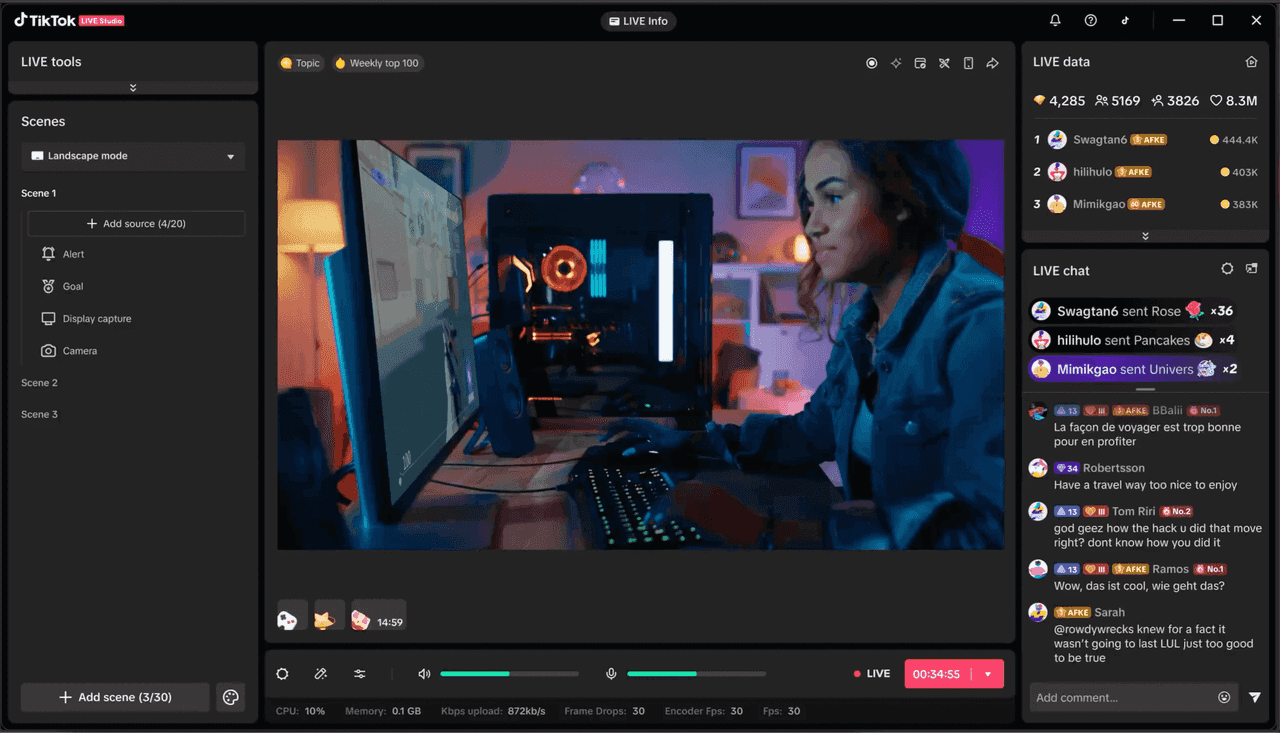
While TikTok Live Studio helps improve technical control, the real difference comes from how you present yourself during a live stream. Small strategic changes can turn a basic stream into a more engaging experience.
Engage with viewers in real time
Active interaction builds a stronger connection with your audience during live sessions. Responding to comments, acknowledging viewers by name, and reacting to their input make the experience feel personal. This two-way communication keeps people invested and encourages them to stay longer.
Choose the right timing
Going live at the right moment can significantly influence your reach and participation. Understanding when your audience is most active, whether evenings or weekends, helps maximize visibility. Consistent timing also allows viewers to anticipate your sessions and return regularly.
Plan your content
Spontaneity can work, but having a clear direction keeps your stream focused and engaging. Outlining key topics or segments beforehand prevents awkward pauses and maintains a steady flow. It also ensures that your session delivers value rather than feeling unstructured.
Use strong titles to attract viewers
A compelling title acts as your first point of contact with potential viewers. Clear, intriguing wording can spark curiosity and encourage users to join your stream. It's important to communicate what the session offers without being vague or overly complex.
Conclusion
In conclusion, understanding how to get live access on TikTok goes beyond simply pressing a button — it involves meeting platform requirements, setting up your stream effectively, and engaging your audience with purpose. From technical setup to content planning, each step contributes to a smoother and more impactful live experience. By addressing common issues and applying the right strategies, creators can improve both reach and interaction. With consistency and thoughtful execution, TikTok Live can become a powerful tool for real-time connection and growth.
FAQs
How to go live on TikTok on PC?
To stream from a computer, creators typically use TikTok Live Studio, which allows direct broadcasting with enhanced control over visuals and layout. After installing the software, log in with your account and configure your camera, microphone, and scene settings. This method is particularly useful for gaming, tutorials, or professional-style streams that require better production quality.
Why can't I go live on TikTok?
Limited access to live features is usually linked to unmet platform requirements or policy restrictions. If your account does not meet the follower or age criteria, the LIVE option will remain unavailable. Additionally, prior violations of community guidelines may temporarily restrict this feature until the account regains full compliance.
How do I get more viewers on TikTok Live?
Attracting a larger audience requires a combination of timing, consistency, and content relevance. Scheduling streams during peak activity hours increases visibility, while promoting your session through short videos builds anticipation. Engaging directly with viewers during the broadcast also encourages retention and boosts overall reach.