What Does UPS Stand for? Understanding UPS Systems in Canada
Canada is facing another hot summer. Extreme heatwaves are expected to push local power grids to their limits, leading to more localized blackouts and sudden voltage drops in many neighbourhoods.
This guide covers what a UPS (uninterruptible power supply) actually does and why it’s becoming a practical must have for Canadian homes in the summer, not just a tech accessory. We’ll walk through how a UPS differs from a traditional backup generator, how it keeps your sensitive electronics safe from grid instability, and how to pick the right system to keep your cooling fans, home office gear, and critical appliances running through the hottest months.
What Does UPS Stand For and Why Do Canadians Use It?
Canada has dramatic weather shifts, and local power grids get stressed at different times of the year. More homeowners are setting up backup power to cover these weak spots, ranging from traditional UPS units to larger portable power station setups for extended outages. Before looking at specific systems, know the basic tech and key terms first.
UPS Meaning in Simple Terms Explained
At its core, UPS stands for Uninterruptible Power Supply. In simple terms, it is an intelligent, automated battery system designed to act as an instantaneous middleman between your primary wall outlet and your valuable electronic devices. Unlike standard backup power systems that require manual activation or a noticeable startup delay, a UPS continuously monitors incoming utility power, monitoring the incoming utility flow and stepping in immediately when that source fails.
Understanding UPS Power
When researching home infrastructure, consumers often ask, “what is UPS power” and how does it safeguard fragile equipment? UPS power refers to conditioned, regulated electrical energy delivered consistently from an internal battery source rather than directly from the utility grid. In modern Canadian infrastructure, the utility power entering your home is rarely perfectly smooth; it fluctuates constantly. A professional-grade UPS system takes this raw grid energy, processes it, and provides clean, stable power. This ensures that your most delicate appliances receive a steady, uninterrupted wave of electricity, shielding them from the inherent volatility of the external grid.
Difference Between UPS and Backup Generator
| Feature | UPS (Uninterruptible Power Supply) | Traditional Backup Generator |
|---|---|---|
| Switching Time | Milliseconds, nearly instantaneous | Several seconds to minutes |
| Noise Level | Quiet, suitable for indoor use | Loud, must be placed outdoors |
| Emissions | Zero emissions | Produces exhaust (diesel, natural gas, propane) |
| Use Case | Home office, sensitive electronics, medical devices | High-power appliances, whole-home temporary backup |
| Maintenance | Simple battery upkeep | Requires fuel and regular engine maintenance |
Common Devices That Rely on UPS Systems
In a typical home, a UPS handles the gear that can’t afford even a split second of power loss. That means your Wi‑Fi router and modem, desktop computer, NAS (network‑attached storage), smart home hub, and security alarm system. Medical devices like CPAP machines or small fridges storing temperature‑sensitive medications also often depend on the steady, interruption‑free power that only a UPS can deliver. For longer backup duration during extended outages, some households also pair larger battery storage systems with solar panels to supplement their UPS setup.
How Does a UPS System Actually Protect Your Home Devices?
Many homeowners believe that a power backup system only brings value during a complete blackout. But a good UPS does a lot more than just keep the lights on. It works like a 24/7 shield for your home electronics. To understand why it’s so effective, you need to look at the everyday power problems it quietly fixes.
Instant Switch to Battery Within Milliseconds
The main job of a UPS is its near instant switchover speed. When a branch takes down a power line or a transformer blows, the UPS detects the loss and flips to battery power in milliseconds. That’s fast enough to stay within the hold up time of most modern electronics, so your gear never reboots, resets, or skips a beat.
Voltage Sags and Spikes Stabilization
Grid instability in Canada often shows up as brownouts (voltage sags) or sudden spikes, not just full blackouts. Voltage sags happen when demand in your neighbourhood peaks and line voltage drops below safe levels. Over time, that wears down your electronics. To combat this, a high-quality Line-Interactive UPS includes Automatic Voltage Regulation, or AVR. It bumps low voltage up or trims high spikes down to safe levels, protecting your gear without constantly draining the battery.
Device Isolation from Grid Noise
The electrical wires flowing through our neighbourhoods carry significant electromagnetic interference (EMI) and radio frequency interference (RFI), commonly referred to as “grid noise.” This noise is caused by industrial machinery, nearby lightning, or even large appliances cycling inside your own home. While basic standby backups offer limited protection, a Line-Interactive or premium Online (Double-Conversion) UPS acts as a true electrical firewall. These advanced systems actively filter out dirty background noise and isolate your sensitive gear, supplying your electronics with clean and stable power.
Continuous Power for Critical Load
By maintaining a dedicated and constant supply of power reserved strictly for your designated “critical load,” a UPS ensures that your absolute priorities are preserved. Instead of attempting to energize non-essential items across the property, the system isolates and funnels its stored energy to the devices that maintain your communication, safety, and operational continuity, maximizing runtime efficiency when you need it most.


Which UPS System Works for Modern Canadian Homes Today?
Picking the right UPS depends on your home type, space, and what you need to power. Canadian homes range from a small Toronto condo to a large Calgary house. When weighing a UPS vs. portable power station setup, the choice usually depends on whether you prioritize instantaneous switchover or longer runtime during outages. Today’s battery technology offers practical options for both needs.
Portable Options for Small Apartments
For people in small condos or apartments, space matters. Portable, compact standby UPS units are light and easy to slide behind an entertainment stand or tuck next to a desk. They carry just enough battery to keep your TV, Wi-Fi router, and essential devices running, so you get peace of mind without taking over your living space.
Whole-Home Backup for Large Households
While traditional UPS systems are designed for short-duration protection, many Canadian households are now also considering larger battery backup systems for extended outages.
The EcoFlow DELTA Pro Ultra Whole-Home Backup Power is engineered for exactly this level of endurance. It doesn’t just protect a single desktop; it acts as a full-scale home energy ecosystem. When paired with a smart transfer switch, it automatically detects grid failure and energizes your home’s backup circuits. Instead of just saving a file and shutting down, this heavy-duty system keeps your high-draw refrigerators running, powers essential household circuits, and delivers the high-wattage capacity needed to run portable or window air conditioning units to maintain indoor comfort during severe heatwaves during a severe heatwave.
Essential Backup for Key Devices
For thousands of Canadians working from home, a stable connection is essential. Even a brief power hiccup can reboot your router or crash your computer. That means getting cut off from a live meeting, corrupting a file, or losing hours of work.
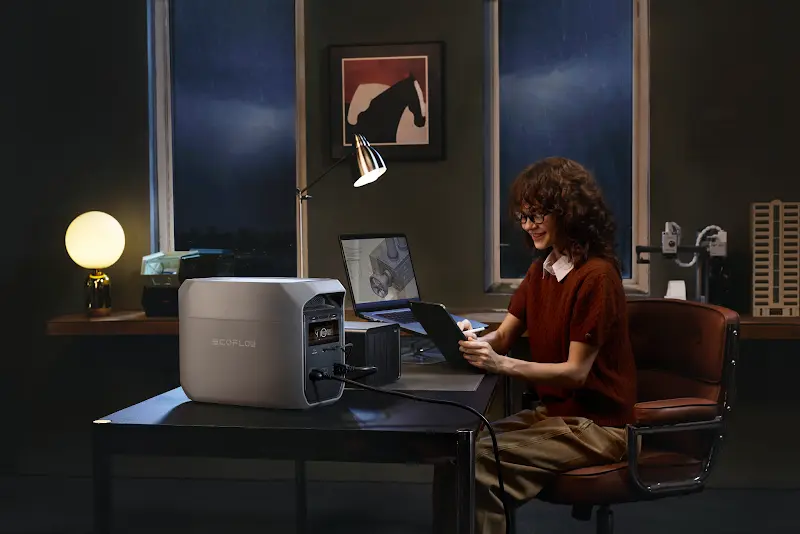
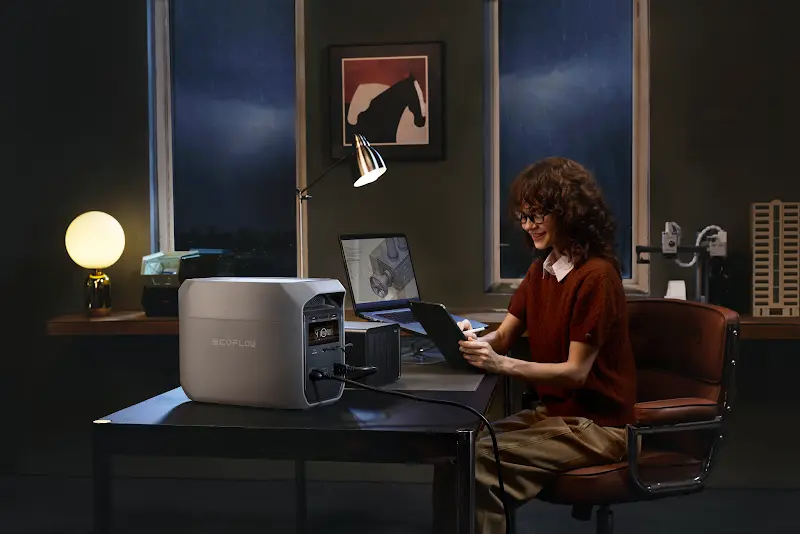
Bridging the gap between a portable power station and a responsive backup, the EcoFlow DELTA 3 Classic Portable Power Station features a 10ms-level fast switchover. While extreme compliance-heavy IT servers or enterprise NAS setups might still require a dedicated online UPS, this ultra-fast response is more than enough to keep typical home office equipment, like your Wi-Fi router, fiber modems, and standard desktop PCs running without a sudden reboot.
Rack Mount for Home Server Racks
For tech enthusiasts, smart home builders, or anyone running serious IT gear at home, standard portable power stations won’t fit the bill. Premium Online Rack-mountable UPS units are built to slide right into a standard 19-inch equipment rack. They deliver clean, continuous, horizontal power with near-zero transfer times to stacks of network switches, patch panels, firewalls, and multi-drive media servers. You keep your cable management tidy and get professional-grade protection for your entire network homelab.
How to Install and Maintain Your UPS System?
To get the most life and performance out of your UPS, you need to install it right and keep up with basic maintenance. A few simple best practices will make sure it’s ready to go the second you need it.
Selecting a Cool and Dry Location
Batteries don’t like extreme temperatures. When you set up your UPS, pick a spot that stays cool, dry, and has good airflow. Think a climate controlled utility closet, a dry basement shelf, or a quiet corner of your office. Stay away from tight, stuffy spaces and keep the unit clear of heat sources like baseboard heaters, furnaces, or direct sun through a south facing window.
Wiring Critical Circuits to Backup Outlets
To optimize your runtime during an actual power emergency, you must be intentional about what gets plugged into your unit. Most UPS systems feature two distinct types of outlets on their rear panels: “Battery Backup + Surge” outlets and “Surge Only” outlets. Ensure that your critical devices—like your main router, external hard drives, and PC tower—are plugged exclusively into the battery-backed outlets, while secondary accessories like desktop lamps, printers, or scanners are relegated to the surge-only side.
Monitoring Battery Health Through Mobile Apps
Gone are the days of guessing whether your backup power system will hold up during a crisis. Modern smart UPS units come fully equipped with integrated Wi-Fi or Bluetooth connectivity, allowing homeowners to sync the hardware with dedicated mobile applications. Through these intuitive smartphone interfaces, you can monitor live input/output wattages, track real-time battery degradation health indicators, run remote diagnostic tests, and receive instant push notifications the moment an anomaly is detected on your local grid.
What Mistakes Should You Avoid When Buying a UPS in Canada?
Choosing the wrong model can lead to early hardware failures or poor coverage during a blackout. By avoiding common buying mistakes, you can make a smart, cost-effective investment that meets your home energy needs.
Selecting an Undersized Battery Capacity
The most frequent error consumers make is underestimating their total power load and selecting an undersized capacity. If your connected devices pull more wattage than the UPS can physically sustain, the system will quickly drain its reserves within minutes, failing to give you adequate shutdown time. Always calculate the combined maximum wattage of all targeted equipment, and select a system that provides a healthy 20% to 30% overhead margin above that total.
Ignore Cold Weather Performance Limits
In many regions of Canada, attached garages, unheated crawlspaces, and enclosed porches drop well below freezing during the harsh winter months. Standard lithium-ion or lead-acid batteries suffer sharp drops in chemical efficiency, storage capacity, and discharge rates when exposed to sub-zero temperatures. If you intend to place a backup system in a semi-exposed area, always check the manufacturer’s technical specifications to ensure its operating temperature threshold can withstand Canadian winter realities.
Overload Traditional UPS Units with Heavy Appliances
A key thing to remember: traditional desktop UPS units are strictly engineered for low-wattage electronics, not heavy motor-driven or high-heating appliances. If you plug a hair dryer, space heater, microwave, or portable air conditioner into a standard desktop backup, you risk tripping the internal circuit breaker, damaging the internal inverter, and voiding your warranty on the spot.
If your goal is to keep high-wattage critical loads running, like your AC, sump pump, or refrigerator, you need to look beyond standard desktop backups. Instead, you should invest in a heavy-duty home energy storage system or a whole-home battery backup paired with a high-capacity inverter, which are engineered specifically to handle massive inductive starting surges and high-wattage household demands safely.
Conclusion
Knowing what a UPS is and how it fits into your daily life is a solid first step toward a more resilient home. For Canadians dealing with unpredictable weather, seasonal grid stress, and the reality of working from home, these systems add a real layer of protection.
Figure out what your household actually needs. Maybe it’s the full scale coverage of an EcoFlow DELTA Pro Ultra for a larger suburban property. Or maybe it’s the smaller, focused reliability of an EcoFlow Delta 3 Classic for your home office setup. Either way, you get peace of mind knowing your home will stay connected, safe, and powered through any unexpected outage.
FAQ
How Many Hours Can a UPS Last Without Power?
A UPS can last anywhere from a few minutes to several days depending entirely on its total battery capacity and the electrical load connected to it. Small desktop units are designed to supply 10 to 20 minutes of runtime to allow for safe file saving and computer shutdown, whereas heavy-duty, expandable systems can easily sustain a large home’s critical appliances for multiple days when configured with extra battery modules.
How to Tell if UPS Battery Needs Replacing?
You can tell a UPS battery needs replacing when the unit emits rhythmic chirping alarms, displays a red warning light, or shows low health diagnostics on its connected mobile app. Another clear physical indicator is a drastic, sudden drop in runtime capacity during routine power tests, or physical swelling and heat buildup around the battery compartment case.
How Much Does It Cost to Replace a UPS Battery?
Replacing a UPS battery can cost anywhere from $30 for small consumer desktop units up to several hundred or thousands of dollars for premium, high-capacity residential systems. For basic lead-acid backup systems, buying a simple replacement cell is quite inexpensive; however, upgrading or replacing the high-end, long-lasting Lithium Iron Phosphate (LiFePO4) battery packs found in advanced home ecosystems represents a larger initial investment that yields significantly greater longevity.
What Is the Lifespan of a UPS System?
The lifespan of the battery cells inside a standard UPS usually ranges from 3 to 5 years for traditional lead-acid models, while modern advanced lithium systems can easily last 8 to 10 years or more. While the internal electronic circuit boards endure for a long time, the actual battery cells degrade naturally over time due to chemical aging and temperature exposure, requiring periodic maintenance or replacement cycles to sustain optimal performance standards.